Hello, Flip44.
Every step is a learning opportunity! Let's work together and clean up those previous records in QuickBooks Online.
I'll share a little bit more about the bank rules first. The rules only applies to the uncategorized or "for review" transactions. Since you need to clean up previous records, what we can do is to undo them from the Bank Feeds page, then recategorize them correctly.
Here's how:
- Go to the Banking page.
- Click the Categorized tab.
- Check the transactions you want to correct.
- Click the Undo button.
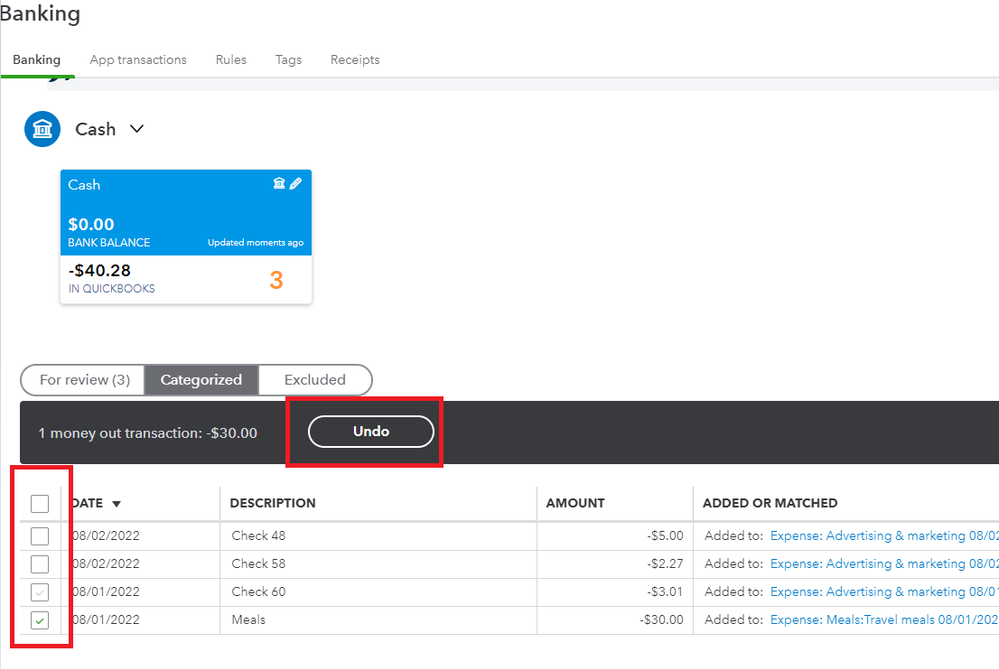
These transactions will go back to the For review tab. We can let the existing and active bank rules recategorize them to the correct accounts.
Though if the system doesn't automatically do so, we can manually review each transaction. Take a moment to read this article if you need help: Categorize and match online bank transactions in QuickBooks Online.
I should also point out that doing this affects your books (for transactions that were added instead of matched). So, we might need to reach out to an accountant if the records we're correcting fall under a closed accounting period.
After categorizing and cleaning up your records, we can start the reconciliation process when ready. If you need some pointers, check out this article: Reconcile an account in QuickBooks Online.
I'll also take this opportunity to share our guides if you'd like to learn the ropes in QuickBooks Online: QuickBooks Online tutorials.
You can always drop by here if you have more questions about using the Bank Feeds. Need assistance in managing your records or reports? Let me know and I'll help you out.




