I appreciate you dropping by here in the Community, @laurene1,
Let me share some insights about modifying invoices. In QuickBooks Online (QBO), it's possible to have your client pay in monthly installments. When your client opts to pay you partially, you would want to ensure to record the payment correctly.
To do this, you may receive the installment to track the invoice as partially paid.
Here's how:
1. On your QBO account, click the +New icon.
2. Choose the Receive payment.
3. Enter the specific customer name.
4. Locate and select the invoice by ticking the box.
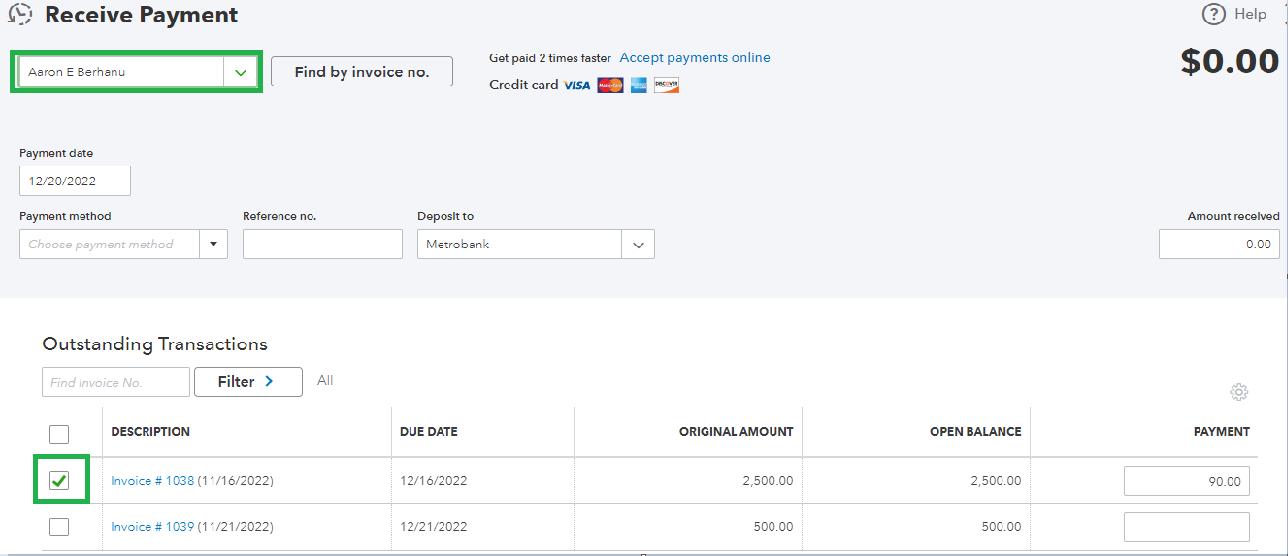
5. On the Payment column, enter the partial payment amount.
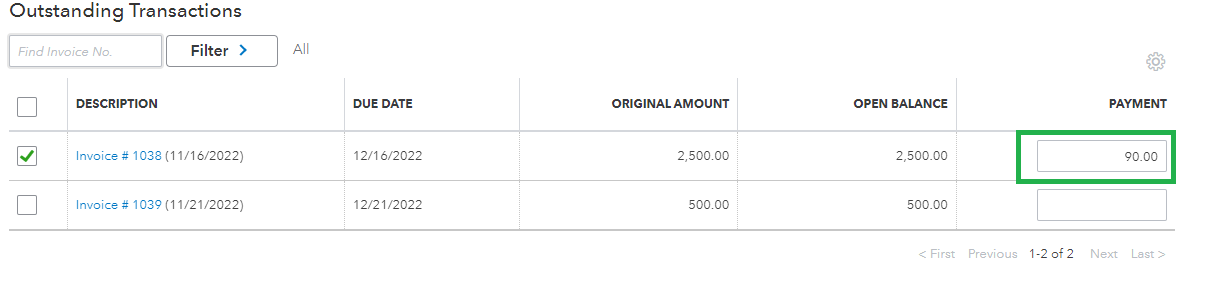
6. Once ready, click Save and close.
After following the given steps, it will then automatically change the invoice status to partial.
You may also choose to use progress invoicing. It will let you split estimates into as many invoices as you need. Instead of asking for full payment at the beginning of a project, you can invoice customers for partial payments.
Additionally, I'll share this article as a reference for the future if you want to learn how to combine multiple transactions into a single record so QuickBooks matches your real-life bank deposits: Record and make bank deposits in QuickBooks Online.
Let me know if you need further assistance with modifying your invoices in QBO by leaving a reply. The Community team is here to help you anytime. Have a great day!




