Turn on suggestions
Auto-suggest helps you quickly narrow down your search results by suggesting possible matches as you type.
Showing results for
Get 50% OFF QuickBooks for 3 months*
Buy nowSolved! Go to Solution.

I have an option on how you can track your total outstanding invoices in QuickBooks Online, Pete.
The quickest and easiest way to keep track of your income and expenses is to run reports specific to your needs. QuickBooks Online (QBO) offers financial reports that give a snapshot of your business.
You'll want to run the Open Invoices report and customize them so it would show the total balance of your outstanding invoices. To do so, follow the steps outlined below:
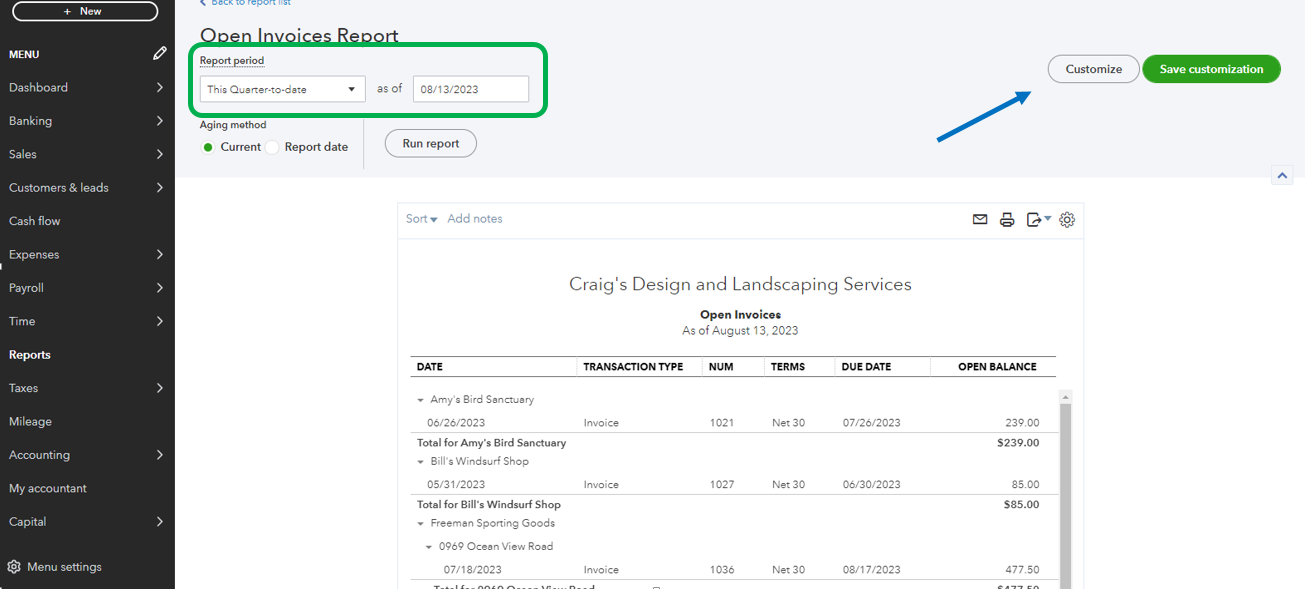
Additionally, check out some of our available lists of reports that you can use: Reports Included In Your QuickBooks Online Subscription.
If there's anything else that you need help with the total outstanding invoices, let us know so we can get back to you. The Community is always right here to address all your needs.
I have an option on how you can track your total outstanding invoices in QuickBooks Online, Pete.
The quickest and easiest way to keep track of your income and expenses is to run reports specific to your needs. QuickBooks Online (QBO) offers financial reports that give a snapshot of your business.
You'll want to run the Open Invoices report and customize them so it would show the total balance of your outstanding invoices. To do so, follow the steps outlined below:
Additionally, check out some of our available lists of reports that you can use: Reports Included In Your QuickBooks Online Subscription.
If there's anything else that you need help with the total outstanding invoices, let us know so we can get back to you. The Community is always right here to address all your needs.


You have clicked a link to a site outside of the QuickBooks or ProFile Communities. By clicking "Continue", you will leave the community and be taken to that site instead.
For more information visit our Security Center or to report suspicious websites you can contact us here


