Turn on suggestions
Auto-suggest helps you quickly narrow down your search results by suggesting possible matches as you type.
Showing results for
Get 50% OFF QuickBooks for 3 months*
Buy now
Warm greetings, lscovil-aquickpi. I see the benefits of being able to modify your customers' statement template.
The option to change the customer statement template in QuickBooks Online is currently unavailable. Nonetheless, you can select to list each transaction as a single line, including all details, and show the aging table at the bottom of the form.
If you wish to change this, here's how:
I've included a screenshot for visual reference.
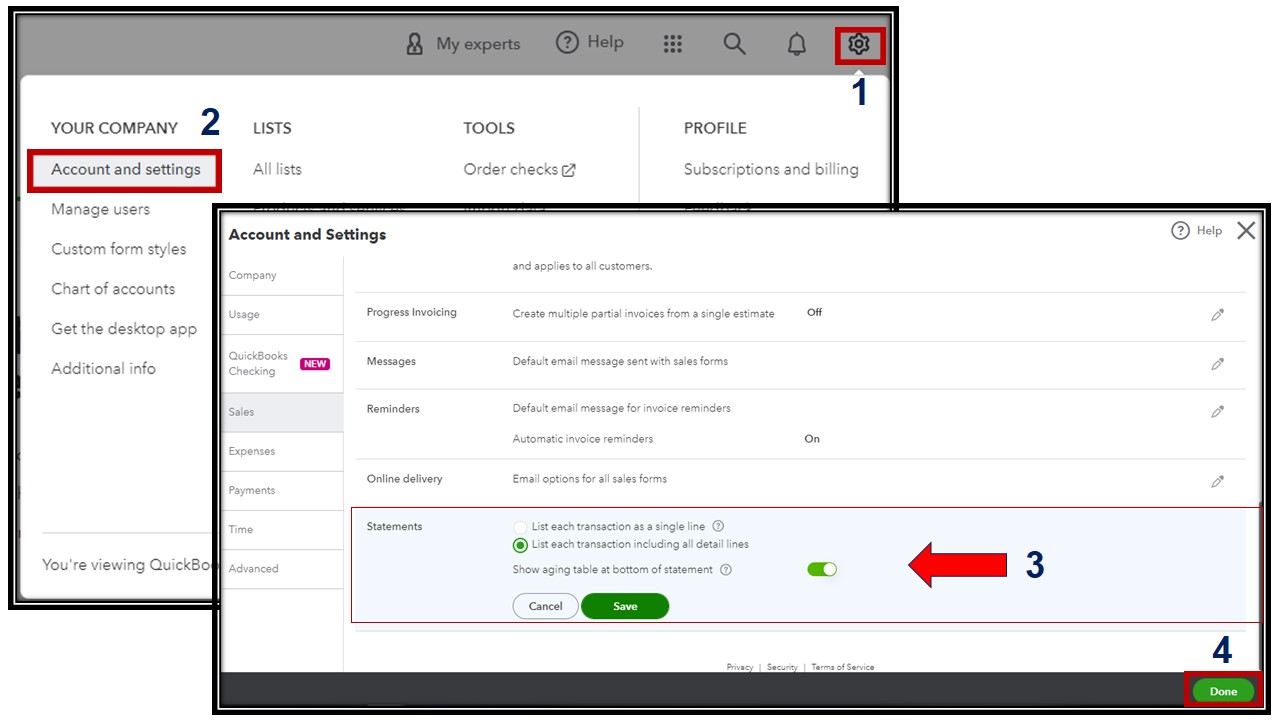
There are various types of customer statements in QuickBooks Online. If you want to know more about them, please check out this article: Create and view customer statements.
Moreover, I'll add these articles to guide you in generating reports in QuickBooks that will let you see your customers' balances and sales summaries.
Whenever you need further clarification and information concerning customers' statements, I'm always here to help you. You can click the reply button below and enter your queries.
Any updates on customisation options for customer statements? Would be great if we could just adjust the column widths to start. The info on the statement carries over to the following line and the overall viewing of the information is not great. Some customisation options would be really appreciated to represent Quickbooks to external people better
Thank you for reaching out and inquiring about the customization options for customer statements in QuickBooks Online (QBO), @JoyP19.
I understand the importance of having flexibility in formatting these documents to ensure they look polished when shared externally. However, customizing it, particularly the columns and widths is currently unavailable in QBO.
Please know that we’re constantly working to make our tools more user-friendly and impactful, so I encourage you to send your idea to our product development team. Doing so helps shape future improvements in the program. Here's how:

In terms of updates, there's no news from our product engineering team regarding specific improvements to customer statement customization. To help you stay updated on the latest product updates, features, and enhancements in QuickBooks, check out the QuickBooks Blog.
At times, you may need to provide a physical or PDF copy of a statement or sales form. Here's a simple guide on how to save a copy for printing or sharing with your customer: Download and save sales forms and statements in QBO.
I'll also share this resource to help you track income, expenses, profits, and losses in QuickBooks: Run financial, inventory, and sales reports in QBO.
We hope this clears up your concern, @JoyP19. Your feedback drives improvements that benefit both you and other QuickBooks users. Feel free to reach out here with any other questions about customer statements in QuickBooks. We're always happy to help!


You have clicked a link to a site outside of the QuickBooks or ProFile Communities. By clicking "Continue", you will leave the community and be taken to that site instead.
For more information visit our Security Center or to report suspicious websites you can contact us here


