Turn on suggestions
Auto-suggest helps you quickly narrow down your search results by suggesting possible matches as you type.
Showing results for
Get 50% OFF QuickBooks for 3 months*
Buy nowHow are contributed reports organized and searched for in the report center?

Good morning, @Anastasia4.
Thanks for reaching out to the Community for support. I'm happy to provide some insight into the contributed reports in the report center.
The report center's contributed reports are categorized into different sub-sections, such as Company & Financial, Customers & Receivables, Sales, Job, Time & Mileage, Etc. We have Intuit created reports and Community created reports where other customers have taken standard reports and shared them with the community. We post these reports in the contributed section of QuickBooks. I've included some steps to view and categorize these reports below.
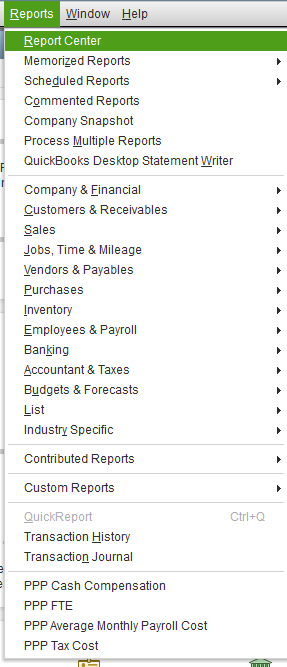
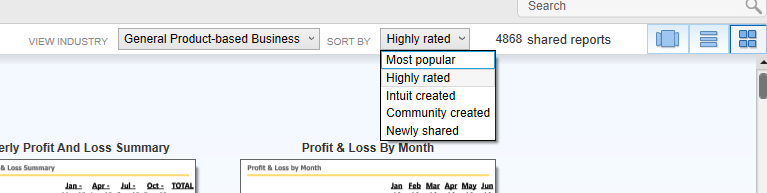
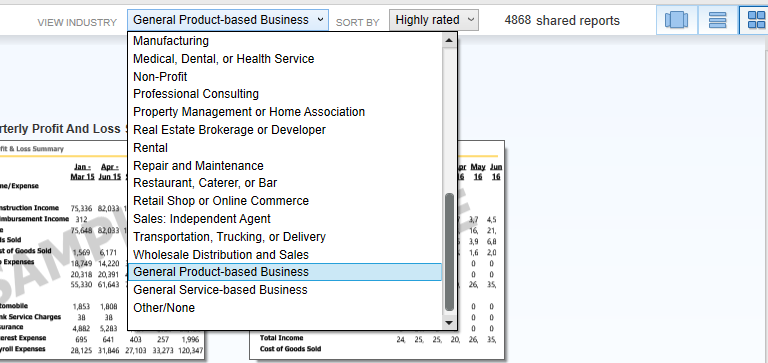
That's all there is to it. Please let me know if you have additional questions or concerns. I'll be here every step of the way. You can reach out to the Community at any time. Take care and have a great day!

Good afternoon, @Toonces.
It's great to see you back with us today. Let's work together to get this error message resolved.
To clarify, is the file located locally or on a server?
If it's on a server, then you'll need to open the file locally and attempt opening the report. If it's stored locally, let's ensure that you're application/product is up-to-date with this link.
Let me know if this helps. I want to make sure that you're able to get back to running your business. Take care!
I don't know where the file is located. I click Run and then get the error message.
Are you suggesting I do a search for .qbr files on the server where QB Enterprise is hosted?
===
Hey there, @Toonces.
Thanks for following up with us and sharing another screenshot of your error message.
Since it appears that this error is only happening when you try opening a report, I wanted to ask a few questions to gain a little more insight.
What version of QuickBooks are you using? For example, 2018, 2019, 2020, etc. I also wanted to see if you are the only user affected by this error. Meaning, if someone else were to sign into QuickBooks with user name on your computer, does the same thing happen? Or if you were to sign into another computer, does it still happen?
Knowing these details will help me to know if this is QuickBooks related or company file related. Please feel free to share any additional information you may have concerning this error.
I'll be sure to keep an eye out for your reply and look forward to chatting with you soon. Take care and have a wonderful day!
Other users get the same error from their workstation.
I get the same error logged onto another workstation.
We are using Enterprise Manufacturing and Wholesale 18.
Good morning, @Toonces.
Hey there again! Allow me to share some information to help resolve this problem.
Based on the details you gave, you'll need to upgrade to QuickBooks Desktop 2019, 2020, or 2021. The reason is because having access to contributed reports is discontinued for 2018 products.
Don't worry. Download the product and then install it. It's that easy!
If you have any other questions, just give me a holler. I'm only a post away if you need me. Have a great day!
Thank you for that answer.


You have clicked a link to a site outside of the QuickBooks or ProFile Communities. By clicking "Continue", you will leave the community and be taken to that site instead.
For more information visit our Security Center or to report suspicious websites you can contact us here


