Turn on suggestions
Auto-suggest helps you quickly narrow down your search results by suggesting possible matches as you type.
Showing results for
Get 50% OFF QuickBooks for 3 months*
Buy nowWhen I run the Deposit Detail Report and I use the filter to only show Pmt Method as Cash or Check or Visa (etc) the report is empty - nothing is displayed. When I do not select a payment method filter the report is complete and all transactions are displayed. What am I missing? Thanks!
Solved! Go to Solution.

Hi there, TrophyHouse.
Let me add some information about the Deposit Detail report in QuickBooks Desktop.
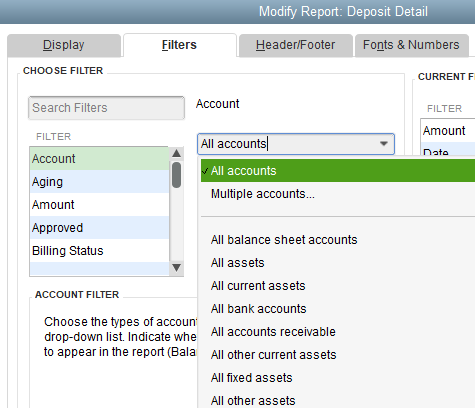
You can use the Deposit Detail report to show selected transactions and other transactions they are linked to, such as an invoice and its payment. If payments are linked to invoices and deposits such as Visa or Cash, you'll need to change the Accounts filter to All Accounts so that other payment methods will also show.
For more details about using the Deposit Detail report, you can check out this link: Use Check or Deposit Detail Reports to show transaction links and mimic Cash Receipt Report.
To learn more about customizing reports, I recommend checking this article: Customize reports in QuickBooks Desktop.
Feel free to return to this thread if you have other concerns about reports. I'd be glad to help. Have a wonderful day!
What is the date range at the top of the report? Is it possible that there just were not any of the transactions you're filtering for in that period?
Also try hitting the Refresh in the Report every time you change something. I think QBs is much better now, but back in the day it would frequently mess you up if you did not Refresh the Report.
Hi there, TrophyHouse.
Let me add some information about the Deposit Detail report in QuickBooks Desktop.
You can use the Deposit Detail report to show selected transactions and other transactions they are linked to, such as an invoice and its payment. If payments are linked to invoices and deposits such as Visa or Cash, you'll need to change the Accounts filter to All Accounts so that other payment methods will also show.
For more details about using the Deposit Detail report, you can check out this link: Use Check or Deposit Detail Reports to show transaction links and mimic Cash Receipt Report.
To learn more about customizing reports, I recommend checking this article: Customize reports in QuickBooks Desktop.
Feel free to return to this thread if you have other concerns about reports. I'd be glad to help. Have a wonderful day!


You have clicked a link to a site outside of the QuickBooks or ProFile Communities. By clicking "Continue", you will leave the community and be taken to that site instead.
For more information visit our Security Center or to report suspicious websites you can contact us here


