Turn on suggestions
Auto-suggest helps you quickly narrow down your search results by suggesting possible matches as you type.
Showing results for
Get 50% OFF QuickBooks for 3 months*
Buy now
Hi there, @linda6.
It's nice to have you with us in the Community today. Let me help you reset the page margins of your invoice.
You can make the invoice fit on only one page by resetting the margins. Here's how:
1. Click the Gear icon and select Custom Form Styles.
2. Locate the invoice template you’d like to modify then click Edit.
3. Go to the Design tab.
4. Scroll down and click on Edit print settings.
5. Click the blue Reset link to change it back to its initial state.
6. Click Done to save the changes.
Once done, try printing the invoice to see if the troubleshooting works. If not, you can go back to the settings and make manual adjustments.
For additional information on how to change the look of your invoices, refer to this article: https://quickbooks.intuit.com/community/Income-and-expenses/Customize-invoices-estimates-and-sales-r....
Don’t hesitate to reach out to me if you need anything else. I’ll be around to help. Enjoy your day!
Thanks for joining us here in the Community, ajmech14.
Since you're getting unexpected results when printing an invoice, let's go ahead and repair Adobe Reader. I'll show you how:
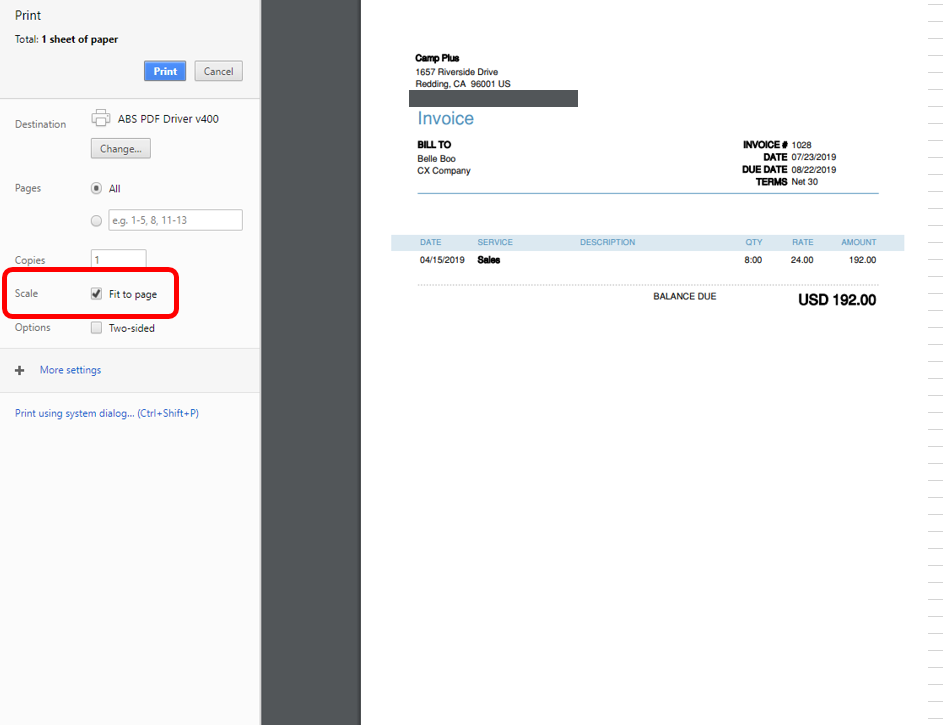
We also have another way to fit the invoice to one page, here's how:
For more troubleshooting steps, check out this article: Fix QuickBooks Online printing issues on browsers for Windows.
Please reach out to me if there is anything else you need about QuickBooks Online. I'd be happy to help. Have a lovely day!
Anyone have a solution for the page content running off the side of the Invoice? We have the exact same problem; one or two Invoices are not rendering correctly; all other are. This is NOT an Adobe issue... these PDFs look bad in all viewers.
Hi @inheritx,
Let me point you in the right direction for support about this issue of printing invoices.
I've checked, and we haven't had any reports like what's described in this thread. If you've already tried the troubleshooting steps provided by my peers @KhimG and @PreciousB above, then I suggest you contact our Technical Support team for assistance.
They can investigate this issue for you, as well as start a screen sharing session, with your permission.
Here's how:
In case you need to email or print multiple invoices, follow the steps provided in the link. You'll also find screenshots in this article that you can use for reference.
Drop a comment below if you have any other questions. I'll get back to you as soon as I can.
Hi can you help me on fixing the print of invoice as when im doing it the vat area of the invoice doesnt fit in 1 row.
can you kindly help me on this
I'd be happy to help you print your invoice, high7.
You can make the invoice print it lower on the paper by resetting the margins. Let me guide you how:
For additional information on how to change the look of your invoices, like how to set one of your other custom templates as the default and personalize your email message, refer to this article: Customize your invoices, estimates, and sales receipts in QuickBooks Online.
Please know that I'm just a post away if there is anything else you need about QuickBooks Online. I'd be happy to help.
I cannot find this function.
I've been trying to also reduce the columns sizes to make it fit but once I do that and select the "print" option it looks exactly the same, the columns do not change.
Where can I find that option in the gear? It's not showing up to me.
Thanks.
Thanks for joining this thread, victor-taxkonnek.
I want to make sure you're able to adjust margins and column sizes when printing in QuickBooks Online.
As mentioned above, you can make any adjustments by editing in the Custom Form Styles area of QBO. If you aren't able to see those options, I recommend first clearing your cache to rule out any browser related issues. The cache can become too full over time and will potentially create certain viewing and performance errors within the system. Here's how to get this done in Chrome for example, to remove anything preventing the screen from loading properly:
The following article provides similar steps for other browsers: Clear cache and cookies to fix issues when using QuickBooks Online.
Please give this a try and let me know how things look afterward. I'll be here if you have any other questions.


You have clicked a link to a site outside of the QuickBooks or ProFile Communities. By clicking "Continue", you will leave the community and be taken to that site instead.
For more information visit our Security Center or to report suspicious websites you can contact us here