Turn on suggestions
Auto-suggest helps you quickly narrow down your search results by suggesting possible matches as you type.
Showing results for
Get 50% OFF QuickBooks for 3 months*
Buy nowIn QuickBooks Desktop 2020, I just just generated my first QuickReport for my Bank's bank register without a problem by clicking the QuickReport button appearing on the top of the register, nice feature..
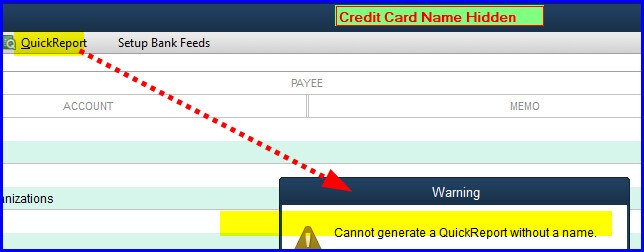
Then I went into the 'bank register' for my business credit card and tried to do the same As shown in image, In this credit card's register, as soon as I click the QuickReport button, instead, I receive the error "Cannot generate a QuickReport without a name." There's nowhere to enter a name???
If a QuickReport is not available for Credit Cards. It should be grayed-out.
Thanks in advance for advice.
Solved! Go to Solution.

I can help you generate the QuickReport in QuickBooks Desktop, @AL_Debit.
To get rid of the error message, let's ensure to select a transaction before clicking the QuickReport button.
Here's how:
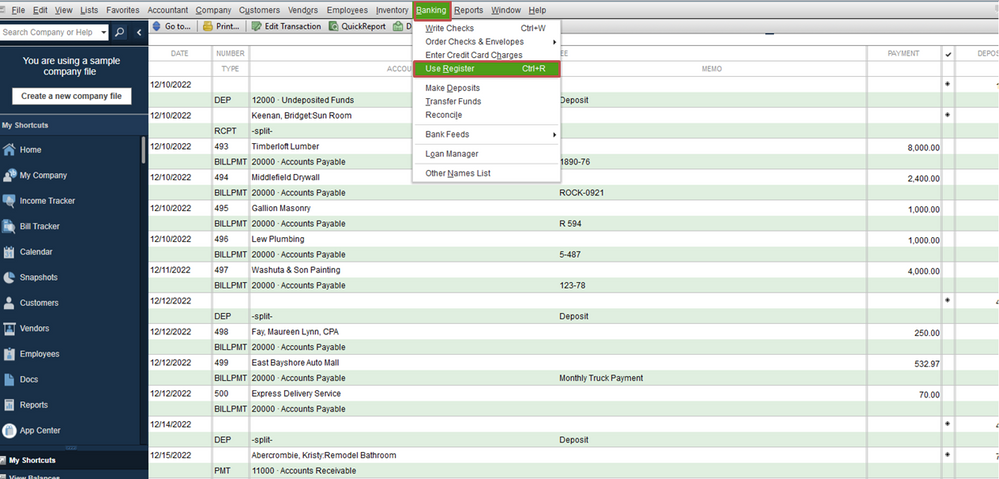
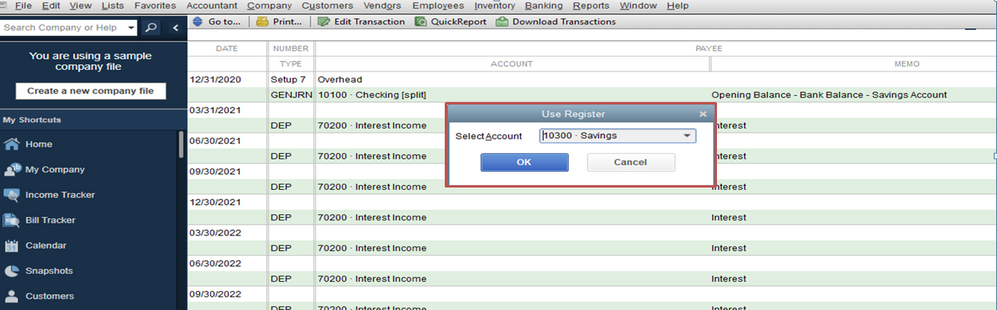
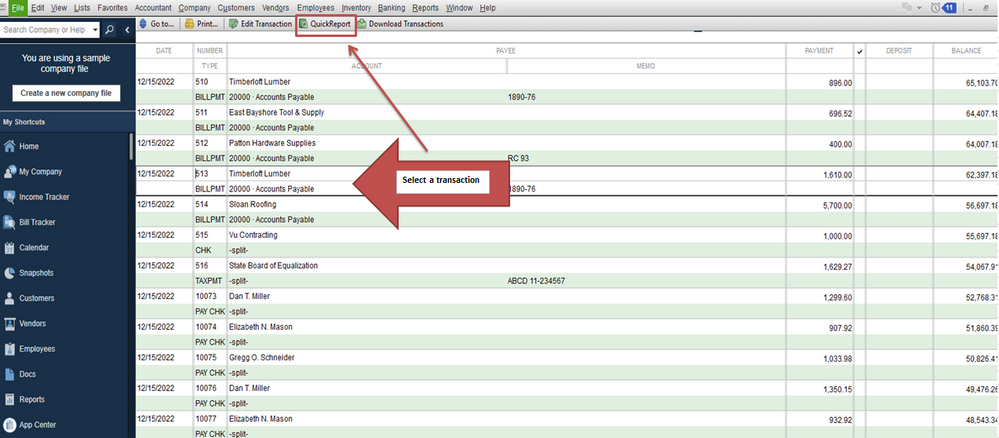
You'll want to personalize your report. Please refer to this article for more details: Customize reports.
If you have other questions in mind, please let me know. I'll get back to you right away. Have a pleasant day.
I can help you generate the QuickReport in QuickBooks Desktop, @AL_Debit.
To get rid of the error message, let's ensure to select a transaction before clicking the QuickReport button.
Here's how:
You'll want to personalize your report. Please refer to this article for more details: Customize reports.
If you have other questions in mind, please let me know. I'll get back to you right away. Have a pleasant day.
Only works if a Name is specified on selected transaction. Ok, I get it.
While this works to create a report for that one entry, it is not what we're looking for. You can change the filter which will then give a report for each vendor or customer. But it won't give you a report for the account. How do we print a report for the account? I know it can be done because I've done it before.
Also, what does the message mean? It's asking for a name but there's nowhere to put a name in. If it's really saying: "I can't run a report unless you select an entry and right click it" then why not say: "I can't run a report unless you select an entry and right click it?" These generic and unrelated error messages don't help anyone.
Hi, Galin.
Yes, you're correct that the QuickReport feature in the account register generates a report for the selected transaction. To view a similar report for an account, you can directly click the Reports menu from the Chart of Accounts.
To do so, please follow the steps below:
On the other hand, I understand that the error message could be clearer. I encourage you to share your feedback directly with our developers so they can work on making it more intuitive in future updates.
We're dedicated to improving QuickBooks, and your input plays a significant role in this process. Please don't hesitate to use the Reply button below if you have any further suggestions or questions. We appreciate your support and look forward to continuing to serve you better.


You have clicked a link to a site outside of the QuickBooks or ProFile Communities. By clicking "Continue", you will leave the community and be taken to that site instead.
For more information visit our Security Center or to report suspicious websites you can contact us here