Turn on suggestions
Auto-suggest helps you quickly narrow down your search results by suggesting possible matches as you type.
Showing results for
Get 50% OFF QuickBooks for 3 months*
Buy nowWe received refunds from a vendor that were on the behalf of a customer. I did a deposit from the vendor and paid the customer, same $ amount, same account (Reimbursements), so that it would zero out. Problem is that when we run the Customer Income report, it shows the customer as a negative income because of the refunds I sent to them. I did a JE for the same account (Reimbursements) debit to the vendor and credit to the customer. The customer's account now works out fine, but the JE is showing a debit AND credit under the vendor and it's not zero'ing ($) out, like the customer's account is. Why would a JE show twice (+/-) under the vendor and once under the customer accounts when it's only a 2-line entry (a debit for $ and a credit for $)?

Hello there, Nancy.
I want to help you out with this journal entry issue you're having in QuickBooks Desktop.
Can you please let me know which vendor report are you looking at where you found the double entry for the journal entry? I need this information to hep you further.
Unless the vendor name is added twice to the JE, then it will most likely to show the lines twice. You'll need to review the entries by clicking the transactions one at a time. You can also delete and recreate the journal entry and see if it gives you the same problem.
You can also run the Verify/Rebuild Utility. This will help diagnose and self-fix data issues in QuickBooks Desktop, especially on reports. Here's how to do that in QuickBooks:
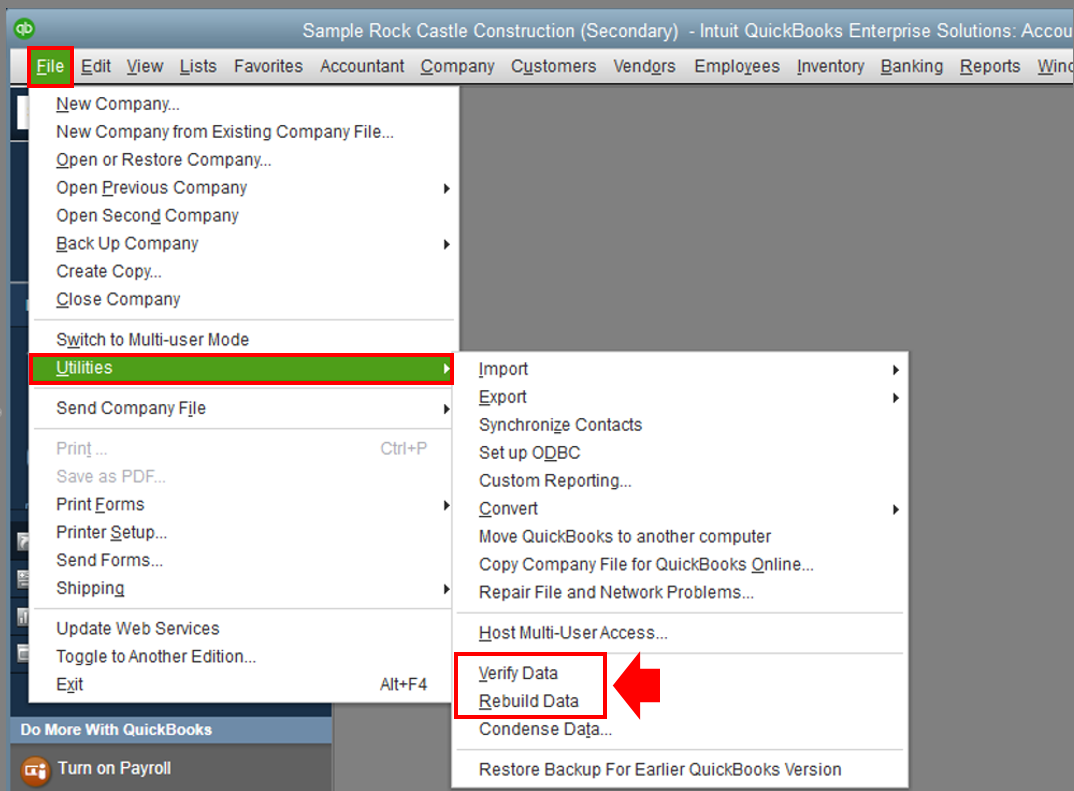
Post here again with the additional details so I can help you further. Have a good one!
Hi Jen_D!!
Thank you for your response. I did the Verify Data and no issues were found. I did not do the Rebuild Data because it required a backup and only IT can do that.
I am using the Expenses by Vendor Detail report.
I have attached the reports for you to review in one Excel file with 3 tabs.
Tab 1 are the JE's I did and you can see they are only 2 lines each. One line hitting the customer and one hitting the vendor.
Tab 2 is the Income by Customer Detail AFTER I posted the JE's. This is $ zero - perfect!
Tab 3 is the Expenses by Vendor Detail AFTER I posted the JE's. This totals the reimbursements. It should be $ zero like the customer.
I really appreciate your help with this. Thanks again!
Hi Jen_D!!
Thank you for your response. I did the Verify Data and no issues were found. I did not do the Rebuild Data because it required a backup and only IT can do that.
I am using the Expenses by Vendor Detail report.
I have attached the reports for you to review.
JE's I did and you can see they are only 2 lines each. One line hitting the customer and one hitting the vendor.
The Income by Customer Detail AFTER I posted the JE's. This is $ zero - perfect!
The Expenses by Vendor Detail AFTER I posted the JE's. This totals the reimbursements. It should be $ zero like the customer.
I really appreciate your help with this. Thanks again!
Hi Jen_D,
I appreciate your response. I did the Verify Data and no issues were found. I did not do the Rebuild Data because it requires a backup and only IT can do that.
I attached a report with:
JE that I did to correct the reimbursements. As you can see they are 2 lines each. One to the vendor and one to the customer.
Income by Customer Detail AFTER I did the JE's - this is perfect
Expenses by Vendor Detail AFTER I did the JE's - this totals the reimbursements and shows the JE's twice (+/-). This should be $ zero like the customer report.
Thank you for your help with this. I really appreciate it!
Thanks for your reply, @Nancy W2022. I'll point you in the right direction of support to sort this issue with your reports in QuickBooks Desktop.
I appreciate you for following the troubleshooting steps provided by my colleague above. However, since running the Verify/Rebuild data tools didn’t fix it, I recommend reaching out to our QuickBooks Desktop Support Team. They have tools to pull up your account in a secure environment and help you zero out your Expenses by Vendor Detail report.
Here’s how to get in touch with them:
To ensure that we address your concern on time, you can check our available hours when contacting our support.
I've attached an article you can use to learn on how to remove existing filters, as well as some information about Custom Summary and Custom Transaction Detail reports in QuickBooks: Customize reports in QuickBooks Desktop.
Get back to me here if you have further questions about managing your reports in QBDT. I'm very eager to help. Take care!


You have clicked a link to a site outside of the QuickBooks or ProFile Communities. By clicking "Continue", you will leave the community and be taken to that site instead.
For more information visit our Security Center or to report suspicious websites you can contact us here


