We’ve got you covered, mischa3176.
We appreciate you for performing the initial steps in trying to find a report for all open balances per invoice. Let us help find a report that will show the outstanding balance per invoice for a specific period.
We can run the Invoice List report to see open invoices and open balances in QuickBooks Online (QBO). Then, set the date to 12/31/2023 however, the due date will always differ from it. I've attached a screenshot with a different sample date for your reference:
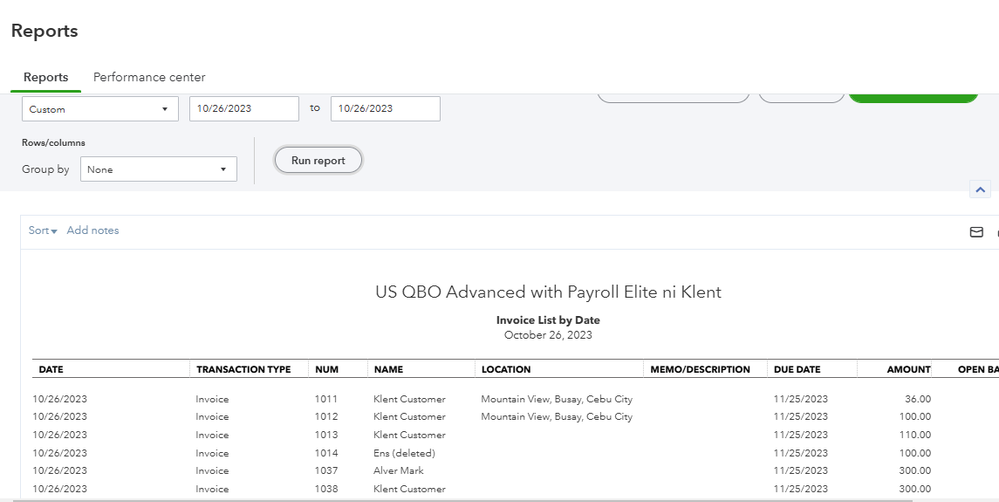
Here's how to run and customize the report:
- Go to the Reports tab on the left-hand menu bar.
- Enter Invoice List in the search bar and click on the option.
- Click the Switch to classic view link.
- In the Report period, choose Custom dates and manually enter the period you need.
- Hit Customize.
- Select the filter section and choose the Due Date and Created Date options.
- Hit Run Report when done.
This reference provides in-depth information about the process: Customize reports in QuickBooks Online. It includes instructions on how to share custom reports and automate one.
Moreover, the resources below will guide you on how to handle any customer-related activities. You’ll also see the list of reports for your QuickBooks subscription:
Drop a comment below if you have additional questions about running an open invoices report or other QuickBooks concerns. We’ll get back to make sure this is taken care of for you. Wishing your business continued success, mischa3176.




