Turn on suggestions
Auto-suggest helps you quickly narrow down your search results by suggesting possible matches as you type.
Showing results for

Thanks for bringing this up in the Community, Jenny.
When you add a bill or timesheet entry to your invoice, it doesn't remove the entry directly. Otherwise, you can customize the invoice layout and hide the Product/service and Quantity columns so only the amount will be displayed.
Here's how:
1. On the upper right side click the Gear icon.
2. Choose Custom form Styles
3. Select the template you want to edit.
4. Go to the Content tab.
5. And click the Body Section.
6. Uncheck the box for Product/Service and Quantity.
7. Hit Done.
After editing the template, just make sure to set it as default template.
1. On the Custom form style, Select the arrow dropdown beside Edit section.
2. Make sure to select Make as default.
Moreover, you may check this article for future reference on how to email or print multiple invoices: Email or print multiple sales form in QuickBooks Online.
If you have further question regarding invoice, please don't hesitate to leave a reply message to this post. Have a good one!
How do I add time to an invoice that has already been created and/or paid?
Hello there, @Jenny.
Allow me to guide you on how you can add time to an invoice that has already been created or paid in QuickBooks Online (QBO).
First off, it's important for you to create billable time entry for the specific customer. Then apply the time entry created to track the billable hours.
Next, you may follow the guide below:
I've included visual steps for your reference.
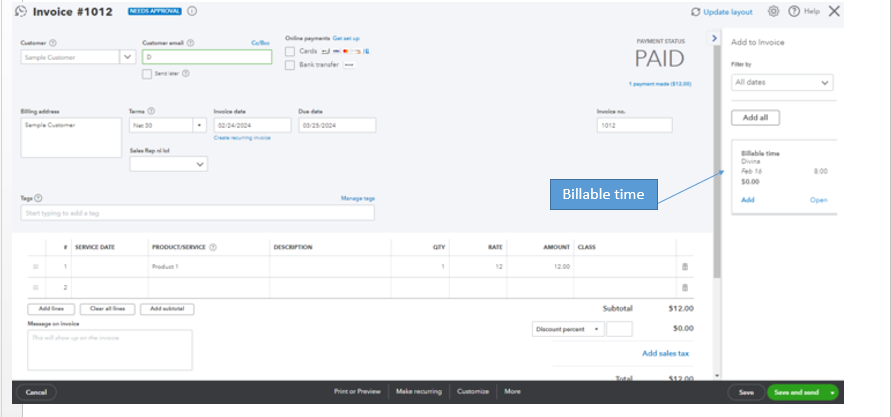
Moreover, if you want to learn more about how to run reports in QBO, you may check this article: Run reports in QuickBooks Online
We're dedicated to ensuring your satisfaction. If there's anything more you'd like to bring up about adding time on your customer's invoice or any other QBO concern, please do so by leaving a comment below. I'm here to help you. Have a good one!


You have clicked a link to a site outside of the QuickBooks or ProFile Communities. By clicking "Continue", you will leave the community and be taken to that site instead.
For more information visit our Security Center or to report suspicious websites you can contact us here


