I can provide you with some information on how you can change the transfer transaction, cherokeewestleat.
QuickBooks Online (QBO) uses a default account, such as Uncategorized Asset to temporarily hold your downloaded transactions. That's the reason they are categorized as transferred to uncategorized assets.
Usually, you're unable to change the category once you're still in the Record transfer section in the For Review tab. You'll have to switch the radio button first from Record transfer to Add to choose the correct expense account in the Category drop-down. I've added the screenshot below for your reference.
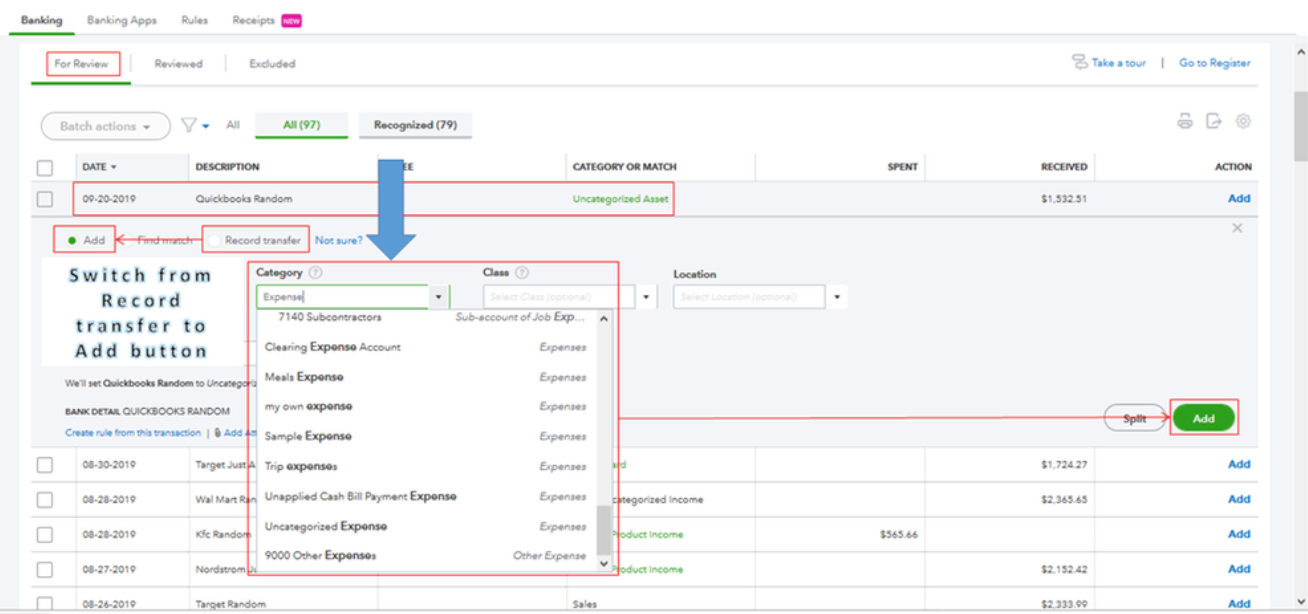
To give you more details on how you can add and match bank transactions with what you've entered in QuickBooks, learn from this article: Categorize And Match Online Bank Transactions In QuickBooks Online.
Furthermore, you'll also have to review your accounts in QuickBooks to make sure they match your bank and credit card statements. Then, compare each transaction with the ones entered into QuickBooks. You can go through this article for your reference: Reconcile An Account In QuickBooks Online.
If you have additional questions about changing the expense account for the transfer transaction, please know we're always right here to help you as always.




