I'll share some insights on how to sort multiple customer payment invoice reports in QuickBooks Desktop (QBDT) and guidelines that could help you achieve your goal, @MABrome.
To generate multiple customer payment reports with invoice references, let's run the Transaction List by Customer. This report displays all the transactions and subtotals of income and expenses per customer. I'll be glad to guide you in customizing it.
Here's how:
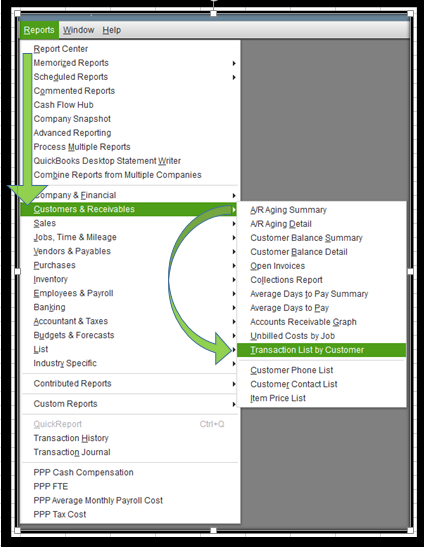
- Click Reports at the top.
- Select Customers & Receivables, and then choose Transaction List by Customer.
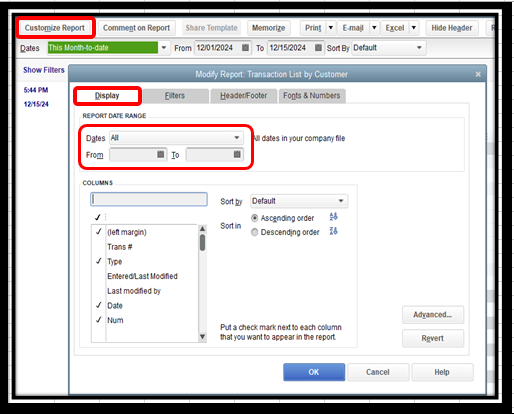
- Click the Customize Report button.
- Under the Report Date Range section, select Last Month.
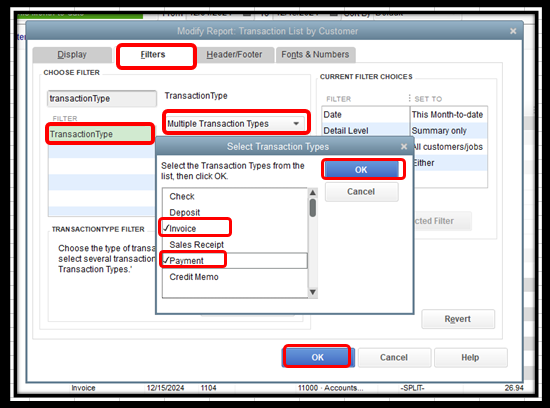
- In the Filters tab, search for Transaction Type.
- In the Transaction Type drop-down, click Multiple Transaction Types.
- Select Invoice and Payment and tick OK.
- Search for Paid Status in the Filters tab and choose Either.
- Hit OK to complete the process.
Here's the attached screenshot for your visual guide.
You can export it to a suitable format like PDF or Excel, edit the columns there, and then add the payment numbers. To do this, click the Excel button at the report's top and choose the Create New Worksheet option.
If you need a hand managing other reports, I'll add these articles as a guide about customizing reports:
For future reference, I've added this article to help you track how your business is doing: Customize company and financial reports.
After managing your reports, I'll include this guide if you need to reconcile your accounts: Reconcile an account in QuickBooks Desktop.
If you have other concerns about the customer's payment report or any other transactions, please let us know by adding a comment below. I'm more than happy to help. Have a good one!




