Turn on suggestions
Auto-suggest helps you quickly narrow down your search results by suggesting possible matches as you type.
Showing results for
Get 50% OFF QuickBooks for 3 months*
Buy nowI run a Yoga studio as a solo proprietorship and I sell different packages (example 5 sessions, 10 sessions, etc.). I accept payment through Stripe and use Acuity for clients to book their sessions. How can I track how many session each client has remaining?

Hello there, KFN,
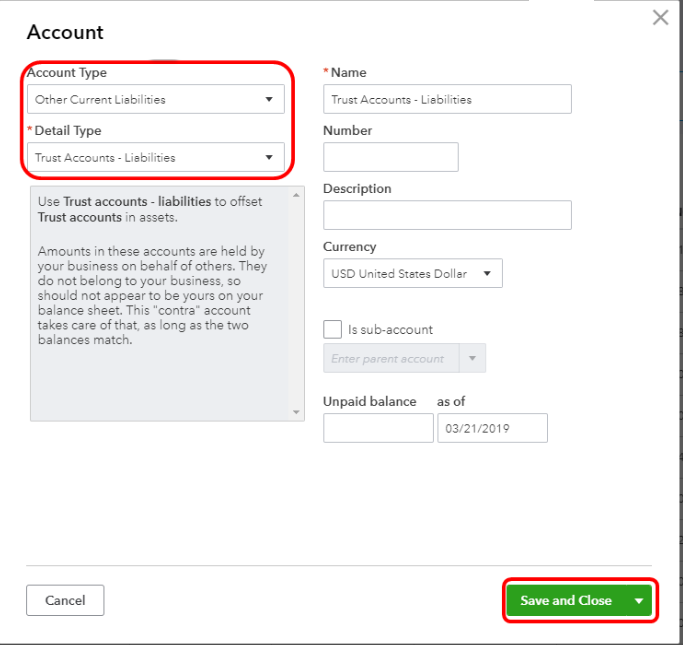
You'll want to create a liability account to track the amount of prepayments. Let me show you how:
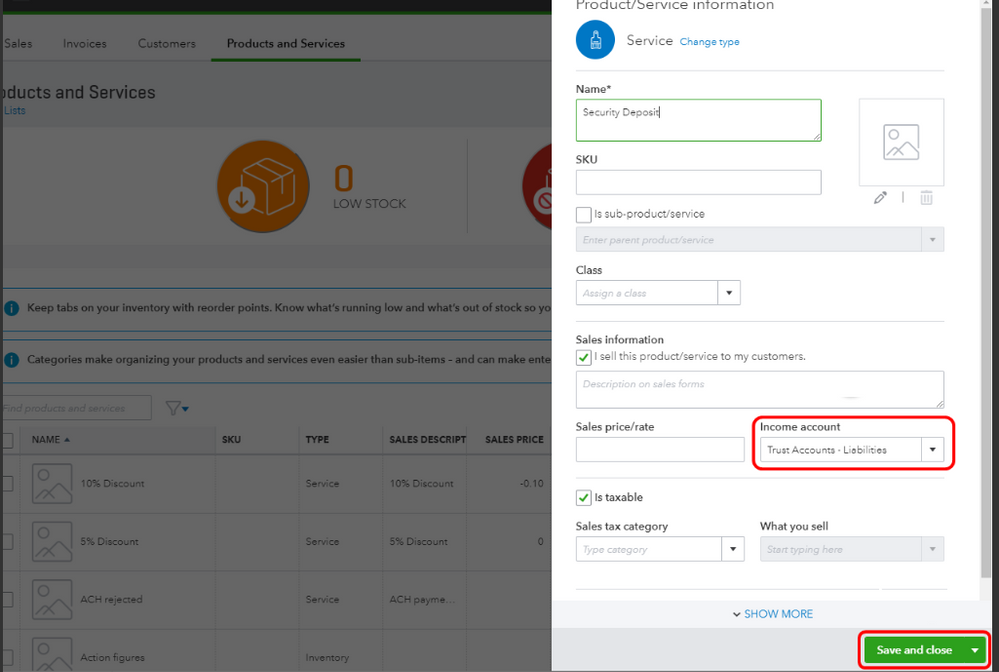
Next, create a service item that you can use when recording invoices. Here's how:
Here's an article for the complete details about prepayments:How to record a retainer or deposit.
Furthermore, to track how many session each client has remaining, you can create one invoice. You can add each line item every time your client takes their yoga session. Make sure to select the Service Date when adding, so you can track when they used the service. You can click on Save, after creating the invoice.
If there's anything else that I can help you with in QBO, feel to leave a comment below.
Consider having a time tracker app to integrate with your QBO. You may create limits on hours billed for sessions.
Thank you! This was very helpful for recording client payments. Could you please elaborate on the invoicing to track each class a client takes and how to track their balance?
I have clients who will pay for a package ex) 5 group classes; and take all 5 as planned. Occasionally a client will pay for a package of 5 group classes, then they request to use some of that credit for a private lesson. So I need to record whichever type of class they take and an up-to-date credit amount.
We can pull up a class report, anneliesemoves.
You can use the Transaction Detail by Account Report to show all customer transactions grouped by class. Then, we'll customize it further to add the Balance and Open Balance column.
Let me show you how:
You can save the report so you don't have to filter it all over again. If you want to send them to your customer, you can either export it (Excel or PDF) or directly email it. For more details on how to do that, you can use this reference: Customize reports in QuickBooks Online.
If you need more help with tracking your classes, you can always post them here. You take care and have a good one!


You have clicked a link to a site outside of the QuickBooks or ProFile Communities. By clicking "Continue", you will leave the community and be taken to that site instead.
For more information visit our Security Center or to report suspicious websites you can contact us here