I'd be glad to help you with your invoice concern, @Antonymatey.
In QuickBooks Online, including a check in the invoice is unavailable. You can only update the payment method on the Receive Payment page. Please see the screenshot below for your reference:

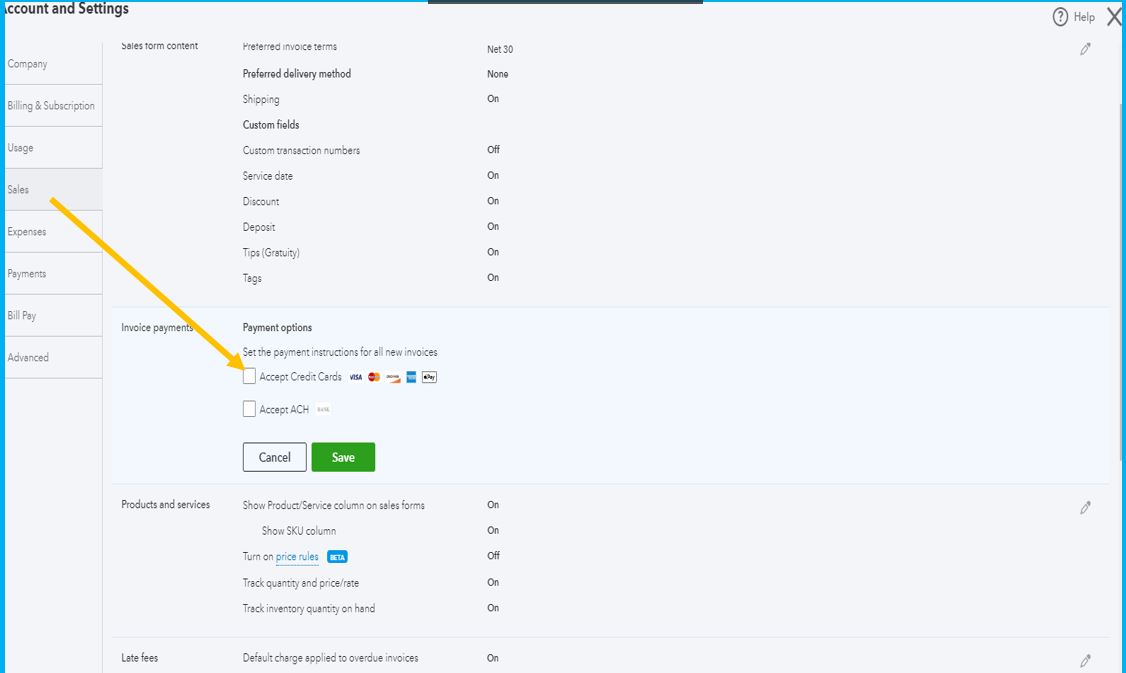
If you don't want to receive the payment online, we can disable the credit card option for all invoices. We’ll have to go to the Payment options to accomplish this task. Here’s how:
- Select the Gear icon.
- Click Account and Settings under Your Company.
- Hover your mouse to the Sales menu on the left panel and click the Pencil icon for Invoice payments.
- This will show the Payment options section.
- From there, uncheck the box for Accept Credit Cards.
- Select Save and Done to keep the changes.
In addition to that, here's a resource that contains a guide on how to handle invoices after processing the payment in QuickBooks:
If you have any clarifications or questions about receiving payments in QuickBooks Online, add a comment below and I'll get back to you as soon as possible. Have a good one.




