Helping you access and delete the uploaded receipts in QuickBooks Self-Employed is my priority, userthe-skyler-murph.
You can follow the step-by-step process below on how to access and delete the uploaded receipts in QuickBooks.
- Click Transactions in the left panel and locate the receipt you want to delete.
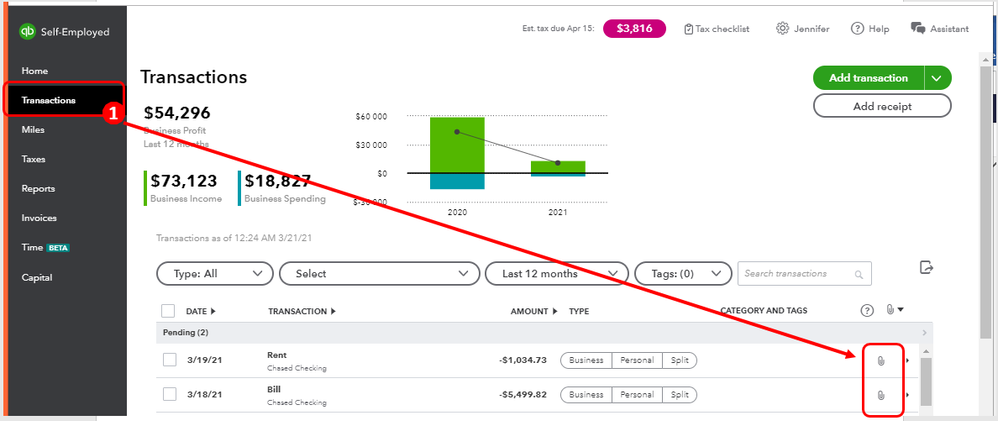
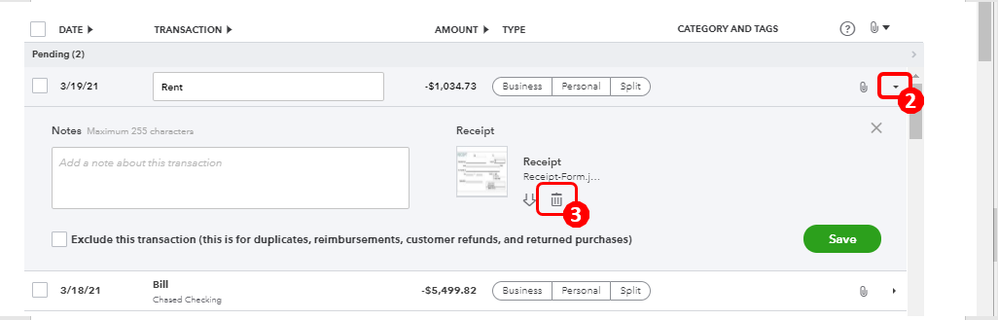
- Expand the transactions by clicking the drop-down arrow beside the file icon.
- Tap the Trash bin image.
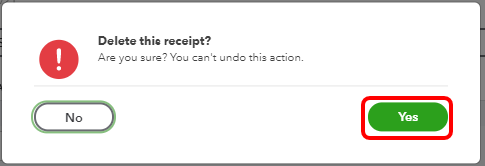
- Tick on the Yes button.
- Hit Save.
You can go through the articles below to know more about how this feature works in QuickBooks Self-Employed. On the same link, you can find a write-up on how to review and categorize your transactions.
Forward receipt images to QuickBooks Self-Employed.
Should I keep my receipts in QuickBooks?
Feel free to get back to me if you have any other receipt concerns or anything with QuickBooks. I want to make sure you're able to access and delete the receipts, I'm always ready to lend a helping hand. Have a great day!




