Hello, accounting477.
You'll simply want to set your own custom template to default in the Custom form styles page. I'll definitely guide you on how to do this:
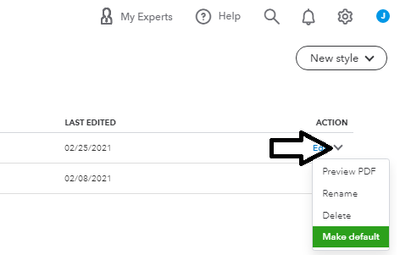
- Go to the Gear icon, then select Custom form style again.
- Locate your template.
- Click the arrow icon under the ACTION column.
- Select Make default.
All of your invoices will now use that template by default. Need a reference on custom forms? This help content can shed more light on the feature: How to Customize Invoices in QuickBooks Online.
If you're ready to create an invoice, this article can guide you through the Accounts Receivable process: Create invoices in QuickBooks Online.
Please visit this thread again if you have more questions for QuickBooks Online. My team and I will get back to you and ensure your needs are taken care of.




