Turn on suggestions
Auto-suggest helps you quickly narrow down your search results by suggesting possible matches as you type.
Showing results for
Get 50% OFF QuickBooks for 3 months*
Buy nowSolved! Go to Solution.

Hello there, @polly-yardmaster.
I'd be glad to walk you through correcting your account type in the Chart of Accounts (COA).
You can follow the steps below to complete the task:
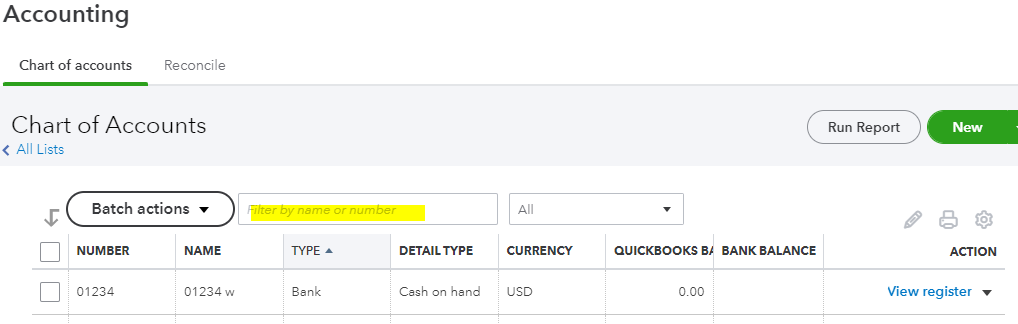
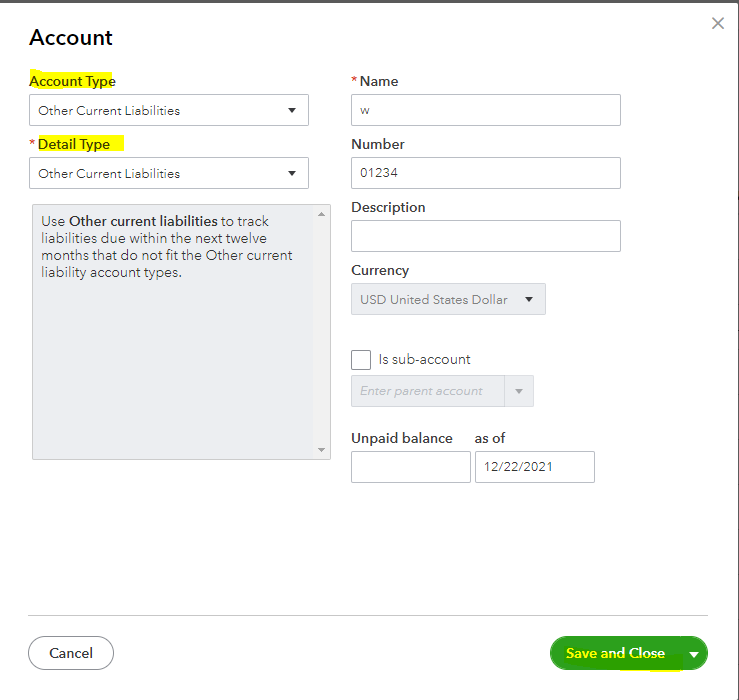
I'd recommend checking this link for more information and tips about handling accounts in QBO: Learn about the chart of accounts in QuickBooks.
Also, you'll want to run the Transaction Detail by Account report by going to the Reports menu. This report shows the lists of accounts you created from the COA. You can use these articles to learn more about managing reports in QuickBooks.
Please let me know if you need further assistance. I'm always around to help. Take care, polly-yardmaster
Hello there, @polly-yardmaster.
I'd be glad to walk you through correcting your account type in the Chart of Accounts (COA).
You can follow the steps below to complete the task:
I'd recommend checking this link for more information and tips about handling accounts in QBO: Learn about the chart of accounts in QuickBooks.
Also, you'll want to run the Transaction Detail by Account report by going to the Reports menu. This report shows the lists of accounts you created from the COA. You can use these articles to learn more about managing reports in QuickBooks.
Please let me know if you need further assistance. I'm always around to help. Take care, polly-yardmaster


You have clicked a link to a site outside of the QuickBooks or ProFile Communities. By clicking "Continue", you will leave the community and be taken to that site instead.
For more information visit our Security Center or to report suspicious websites you can contact us here


