Welcome to the Community, @EricTcrow. The easiest way to remove a vehicle from your QuickBooks Self-Employed account is to make it inactive.
Vehicles can’t be fully deleted. If the vehicle you want to remove is set as your primary, then you'll need to assign another vehicle as your primary first, then mark the old one inactive. If you don’t have another vehicle, you can create a sample vehicle to use as the new primary.
To assign another vehicle as primary, you can follow these steps:
- Click the Gear icon.
- Go to Vehicle info.
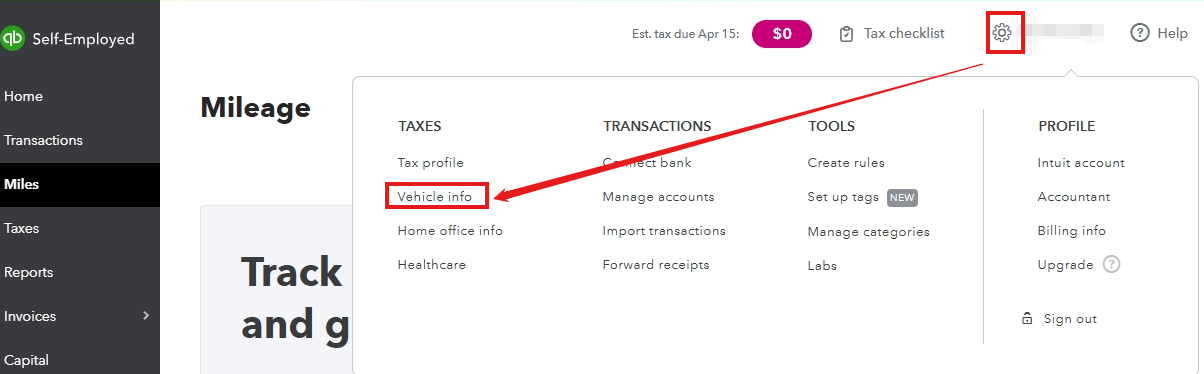
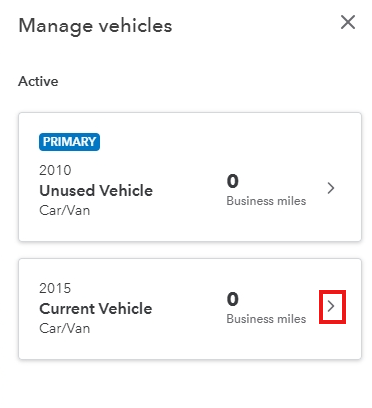
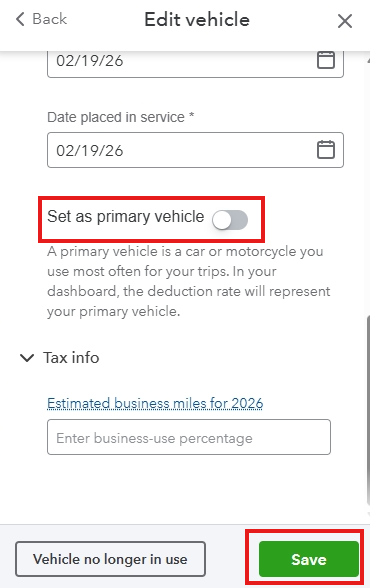
- Find your current vehicle, click the arrow, and select Set as primary vehicle.
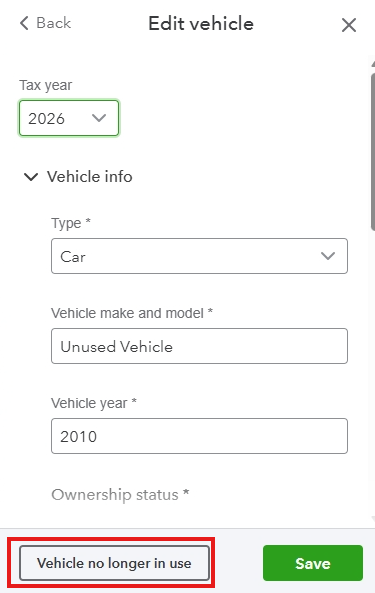
After setting a new primary vehicle, return to your unused vehicle and click Vehicle no longer in use to make it inactive.
You can check out this helpful article for guidance on managing your vehicles and mileage tracking: Set up vehicles and mileage tracking to use with the mobile app.
If you have any other questions about managing your vehicles, mileage, or anything else, feel free to ask.




