Turn on suggestions
Auto-suggest helps you quickly narrow down your search results by suggesting possible matches as you type.
Showing results for
Get 50% OFF QuickBooks for 3 months*
Buy now
The program makes expense tracking easy, @gken70. Let me show you the options to ensure you get the data you need.
Before that, you mentioned you couldn’t get a report and only access 50 expenses out of 400. Did you encounter an error? This helps me determine the correct course of action applied to your situation.
In QuickBooks Online, you can generate comprehensive reports like Transaction List by Vendor and Expense statements to track all expenses. Moreover, you need to select the Enable Editing button in Excel to view the complete report.
Here’s how:
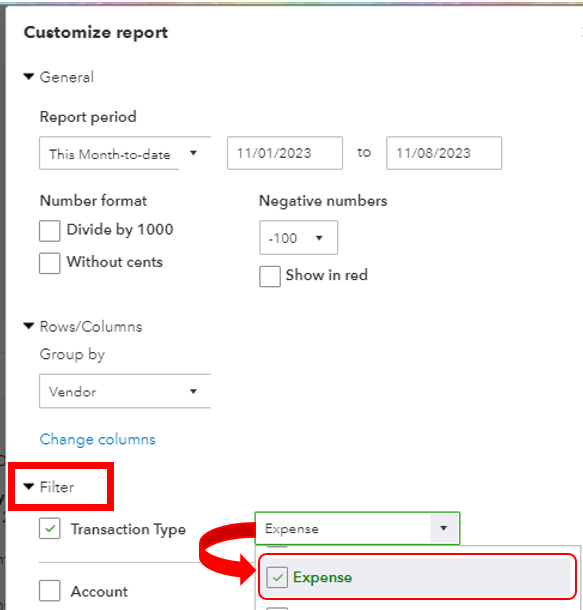

If you export your list from the Expenses menu, please know that QuickBooks only displays up to 300 rows. You'll want to export your transactions in smaller batches until you gather them entirely.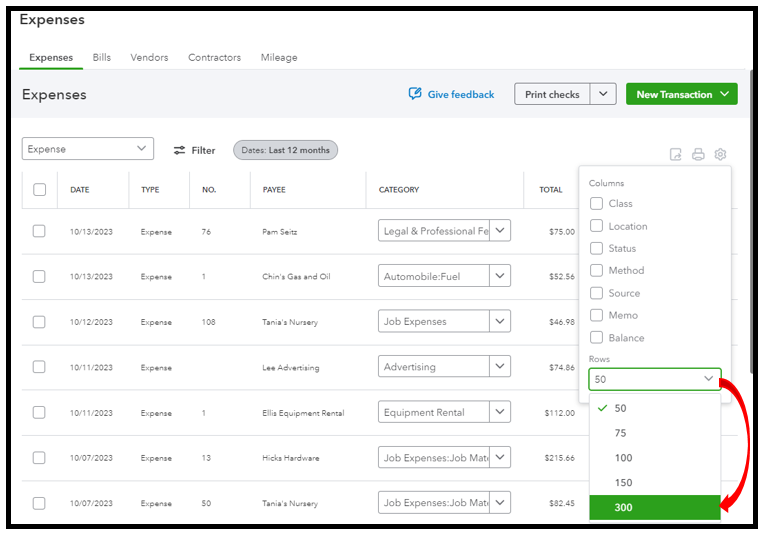
In case you’d like to save the current customization settings for future use, print and email your reports, these resources can guide you through the process:
I’m just a few clicks away if you need further assistance managing your company files. Simply drop a comment below, @gken70.
Thank you for your reply. FYI, I have never gotten an error message.
I just tried your first suggestion and got an expense list for all of 2023.
I changed the settings to 2022, picked the date range and I got one expense to show...there should be around 100. I tried it again...same result. I backed out of the whole process and tried it again...same result.
I went back to the expense menu and changed the output to 300 (I wasn't aware that there was a default limit). This appears to be working. I will try this route for all years. Hopefully I can get the report I need.
Thank you for your assistance. It appears that code change is happening because the GUI is different this morning than it was last night. I'm wondering if code changes are affecting our experiences. I have noticed a lot of glitchyness recently.


You have clicked a link to a site outside of the QuickBooks or ProFile Communities. By clicking "Continue", you will leave the community and be taken to that site instead.
For more information visit our Security Center or to report suspicious websites you can contact us here


