Hi, pmleija.
Could you share the exact error message preventing you from printing the report? This will help us better understand the issue and provide precise troubleshooting steps.
If clicking the Print button doesn’t work, we can try some troubleshooting steps to resolve the issue. You can refer to this article for reference: Test sequence for PDF printing issues.
If the same issue happens after the troubleshooting steps, you can contact our Live Support Team for more in-depth review. Here's how you can reach them:
- Go to the Help menu, then click the Search tab.
- In the search box, type Contact Us.
- Click Contact Us and hit Callback.
You can find their support hours in this article: Get help with QuickBooks products and services.
Alternatively, you can export the report as a PDF file and print it outside of QuickBooks Online:
- Click the Export icon on the report and select Export to PDF.
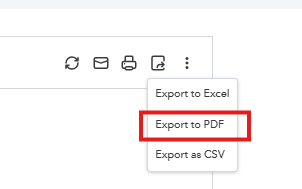
- Open the PDF file and print it from your computer.
Please feel free to reach out if you have any further questions or concerns. We’re always here to help.




