Welcome to the QuickBooks Community, @usercob.
QuickBooks Online (QBO) and QuickBooks Desktop (QBDT) are two different platforms. You're able to set up multiple client's projects through the Projects feature in QBO. While you need to define a job for the customer to track your income and expenses on a job-by-job basis in QBDT (Pro). Let me guide you how.
- Go to the Customers menu.
- Choose Customer Center.
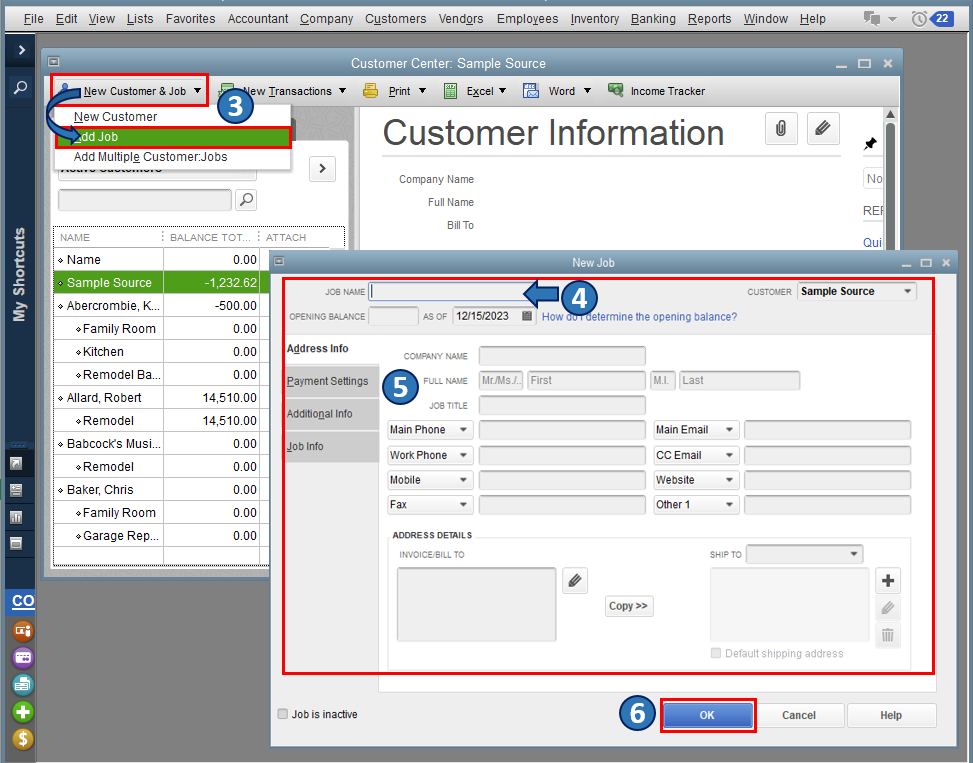
- Click the New customer & Job drop-down menu, then select Add job.
- Enter an appropriate Job Name.
- Fill in all the necessary details.
- Click OK.
I've attached a screenshot below that shows the last four steps.
For the step-by-step guide, I'd recommend checking out this article: Tracking job costs in QuickBooks Desktop.
After that, you can utilize the available job reports. This way, you're able to identify which client's project is profitable and which isn't. With this, you're able to create better estimates and analyze how well each job is progressing financially. Just go to the Reports menu, then select Jobs, Time, & Mileage.
Additionally, the QBDT software lets you track account balances by department, business office or location, separate properties, or any other meaningful breakdown of your business. If you wish to learn more about this, you can refer to this article: Set up and use class tracking in QuickBooks Desktop.
If you have follow-up concerns regarding projects and tracking income and expenses per job in QBDT or other inquires, please let me know. I'll be around to help. Take care always.







