Turn on suggestions
Auto-suggest helps you quickly narrow down your search results by suggesting possible matches as you type.
Showing results for
Get 50% OFF QuickBooks for 3 months*
Buy now
Let's ensure you're able to access the receipts from Amazon, MFC1.
For the time being, we have an ongoing investigation regarding your concern. Our software engineers are working diligently to identify the root cause of the problem. We assure you that we are taking all necessary steps to get this rectified as soon as possible.
For now, I recommend contacting our support team. This way, you'll be added to the list of affected users and receive status updates through email or SMS. For a faster transaction, provide this investigation number to our representative: INV-91481. Here's how:
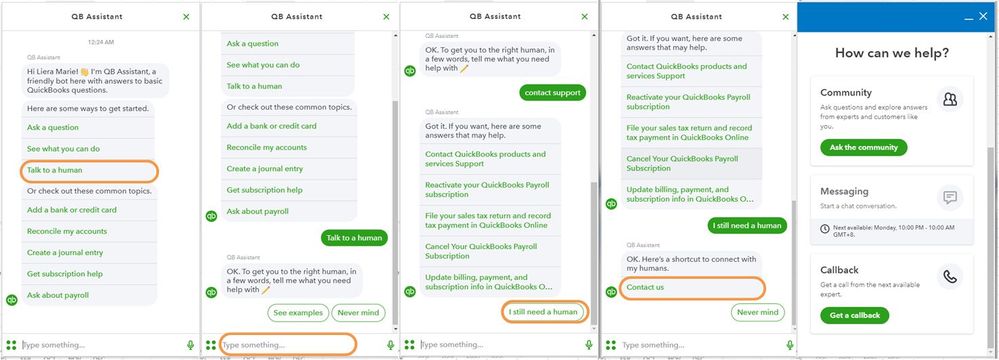
Let me know in the comments if you have other concerns or questions about managing the QBO account. I'll gladly help. Take care!
I am having this same problem when I select "see all" on my Amazon transactions having more than 3 items. It has added significantly more time to my bookkeeping to categorize these expenses. Has anyone come up with a solution/fix for this issue?
Thanks!
Thank you for reaching out to us regarding the issue you're experiencing with Amazon transactions in QuickBooks Online (QBO), @BELC.
Upon checking, the cases related to the "See all" link not working properly are linked to this investigation number (INV-91481). While we're still working on resolving it, here are some workarounds to help you manage your transactions:
If the issue persists, I recommend that you reach out to QuickBooks Online Support, especially if you haven't been added to the list of affected users. This will ensure that you receive updates on the status via email.
Here's how:
In addition, you may check out this article as your future reference for more details and information about categorizing and matching transactions in QBO:
If you need more help handling, please don't hesitate to reach out to us during this process. Our team is here to support you. Have a good one!


You have clicked a link to a site outside of the QuickBooks or ProFile Communities. By clicking "Continue", you will leave the community and be taken to that site instead.
For more information visit our Security Center or to report suspicious websites you can contact us here


