Hi, tporlich. I'm pleased to have you here today. I'll share some insights on how estimates work in QuickBooks Online (QBO).
The system allows your customers to view the estimates you sent to them. However, letting them sign and return the transactions electronically is not an option for now. The good news is that you can consider using a third-party app that supports that process.
There are several apps developed that can be integrated with QuickBooks. To find one, you can follow these steps:
- Sign in to your QuickBooks account.
- Go to the Apps menu, then Find apps.
- Search for an application from the field provided.
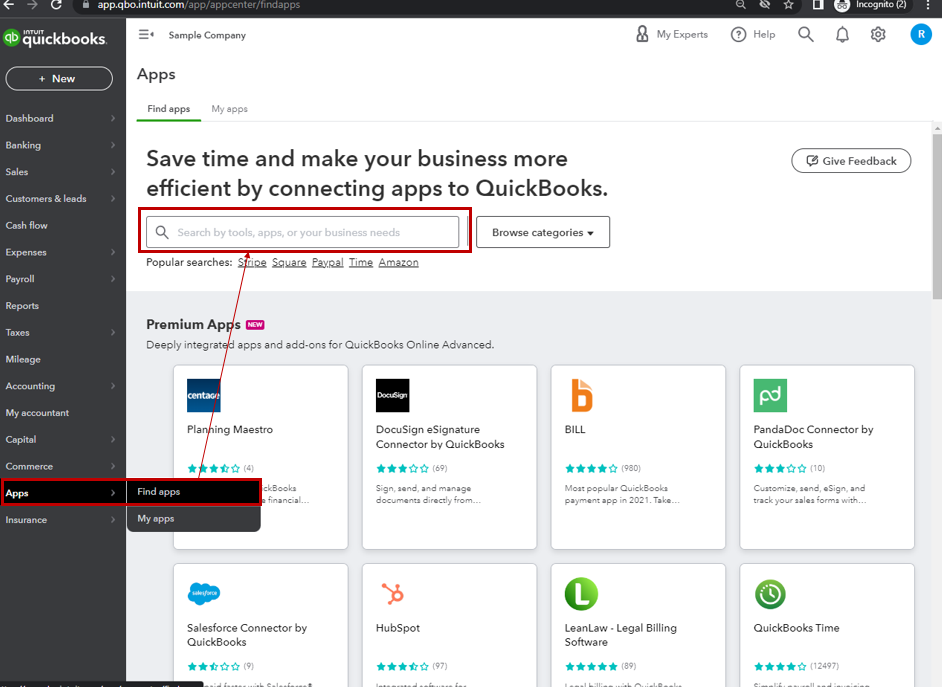
Or, you may directly visit the apps store.
On the other hand, this article has more detail on the process that you can use as a reference while managing your estimate entries: Create and send estimates in QuickBooks Online. When you're ready to change an estimate into an invoice, see this link as your guide: Convert an estimate into an invoice in QuickBooks Online.
Please feel free to get back to me here with any additional questions about your estimates. I always have your back. Thanks for dropping in, and cheers for more success!







