Turn on suggestions
Auto-suggest helps you quickly narrow down your search results by suggesting possible matches as you type.
Showing results for
Get 50% OFF QuickBooks for 3 months*
Buy nowI have already look at the "Vendor Contact List" report and in the "Track 1099" column it says "yes" for the vendor. But when I run the "1099 Transaction Detail Report" and the report does not contain any data.

I appreciate you for making an effort to check if the vendors are eligible for 1099 tracking, Mark.
My main goal is to ensure all the correct information will show up in the 1099 Transaction Detail Report. Beforehand, may I know the report period you'd like to view? Adding additional details will help us determine its cause.
The report will pull the transactions that have been mapped to a box when preparing the forms. To do so, go to Payroll, then select Contractors. From there, click on Prepare 1099s. Once done, you can now map the correct accounts.
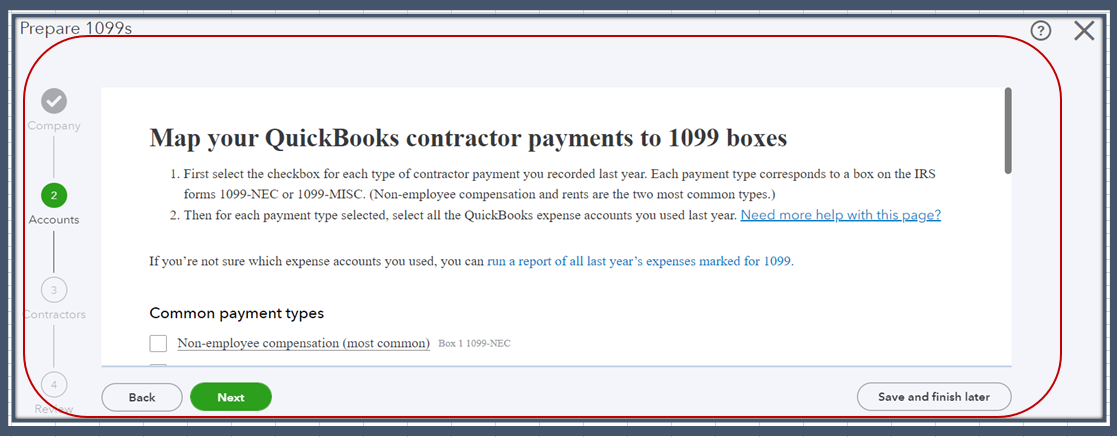
Also, review the transactions for the vendors marked as 1099 eligible. Make sure that the transactions meet the criteria for reporting, such as payments made via cash, check, or direct deposit and exceeding the minimum reporting threshold ($600). Please know that the payments made by credit card, debit card, gift card, or a third-party network like PayPal aren't included. QuickBooks Online (QBO) automatically excludes these for you.
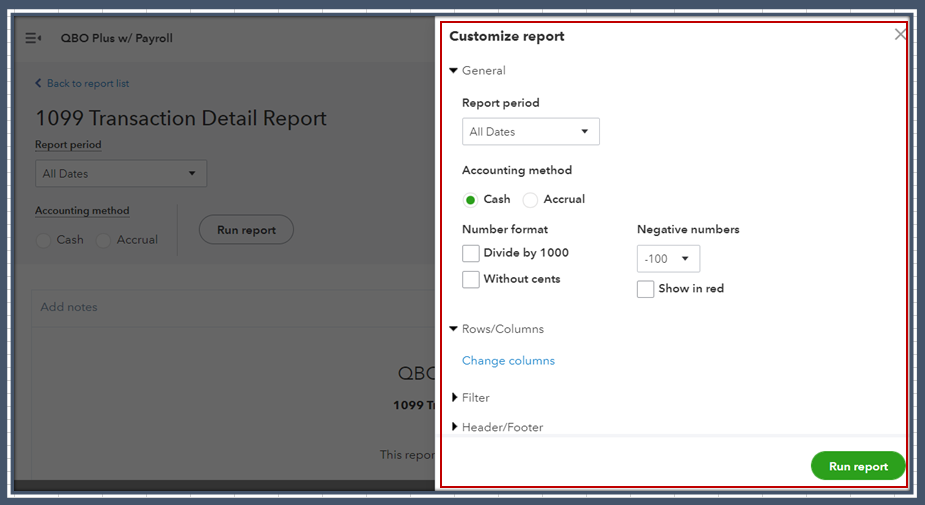
Once everything is all set, I recommend logging out and back into QBO. Doing so refreshes your account for the changes to take effect. After that, run the report:
If it is still blank, I suggest accessing your account using a private window. This way, we can determine whether this is a browser cache-related issue. The browser utilizes cached data to load web pages quickly. However, excessive cache can lead to problems that impact the appearance and functionality of your account.
An incognito mode helps us verify the issue since this doesn't save any files. Here are the keyboard shortcuts:
If the info show, clear the browser's cache. Doing so deletes all the data from your browser and optimizes its performance. Using other supported browsers also helps us verify if this is a browser-specific issue.
Please keep me posted if you have any other concerns about the 1099 report. I want to make sure everything is taken care of for you.
In your reply you asked, "may I know the report period you'd like to view?" We have been using QBO for only 3 months so the report period will be the last thee months..
I appreciate you for sharing the reporting period you'd like to see, Mark.
It's my priority to ensure you can see the data in the report. Beforehand, have you performed the steps shared by my colleague?
If you haven't, I suggest performing them. In case the issue persists, I recommend contacting our QuickBooks Support Team. This way, they can pull up your account securely and can help locate the 1099 in the report. I'll show you how:

Please check our support hours for timely assistance.
To learn more about tracking your 1099 transactions, you can read through these articles:
Keep me posted on any other 1099 concerns by leaving a comment below, and I'll respond promptly. Take care.


You have clicked a link to a site outside of the QuickBooks or ProFile Communities. By clicking "Continue", you will leave the community and be taken to that site instead.
For more information visit our Security Center or to report suspicious websites you can contact us here


