Thank you for your first post today, chelms. I can assist you in adding credit card and bank fees to your invoices so your customer can include them in their payments.
Yes. The system allows you to charge credit card fees to your customers. However, you'll have to perform this task manually by creating a service item in the Products and Services window.
To start:
- Go to the Gear icon, then choose Products and Services.
- Tap on New, then pick Service.
- Enter the name of your service item (bank fees, service fees).
- Select the account you'd use to track the processing fees.
- Then, click Save and Close.
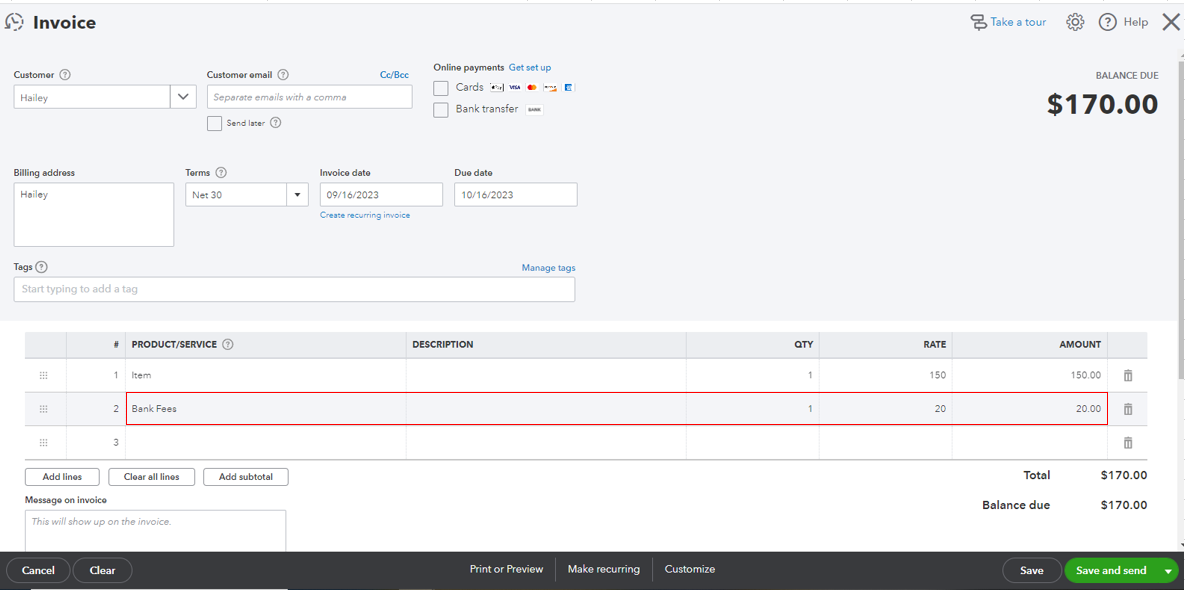
Once done, include the processing fee as an additional line item to your invoice to charge your customers. I'm adding this screenshot as your visual reference.
You can also run through the resources from this link for more tips about the process: Manually add transactions to registers in QuickBooks Online.
When you're ready to receive your customer payments, track them right away through the Receive Payments window.
Please let me know if you have follow-up questions while working with your invoices in our system. I'm just a few clicks away to help you again. Have a good one!







