Turn on suggestions
Auto-suggest helps you quickly narrow down your search results by suggesting possible matches as you type.
Showing results for
Get 50% OFF QuickBooks for 3 months*
Buy nowHI I am using Enterprise for Contractor.
I am trying to link items (cost codes) by class, is this possible? I would to a link individual items to a class
eg Project Management (item) to Construction (class)
I am using Procore for my project tracking and management.
Thanks in advance
Tracey
Solved! Go to Solution.

Welcome to the Community space, Tracey203.
Yes, QuickBooks Desktop Enterprise allows you to assign a class to an item. I'll guide you on how to do it.
You must first enable class tracking in the Preferences.
Here's how:
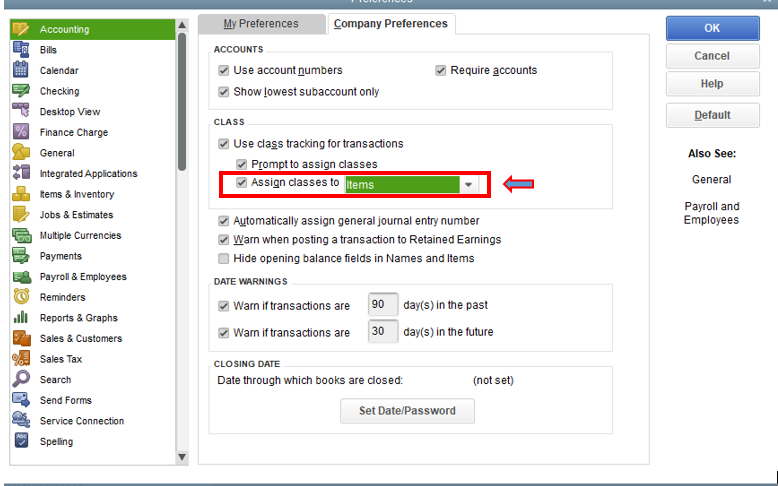
You can now select Item List from the Lists menu. to add or edit an item and assign a class to it.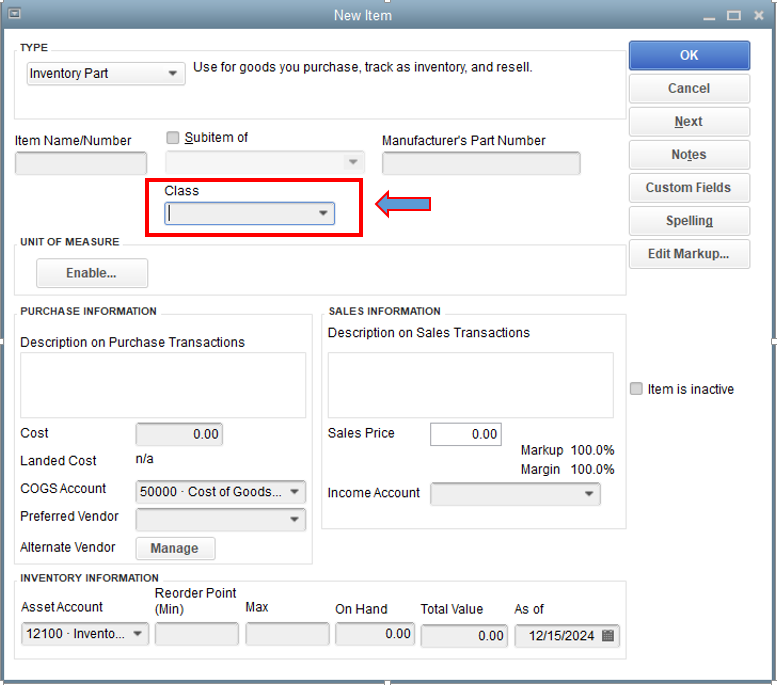
Want more guidance on the Class tracking feature? I advise reading the following article: Set up and use class tracking in QuickBooks Desktop.
You can run reports in QuickBooks to check your sales data and other financial data if necessary. In case you need to familiarize yourself with the reports, I'll include this resource: Understand reports.
If you need anything else, please let me know. I'll be around to help you.
Welcome to the Community space, Tracey203.
Yes, QuickBooks Desktop Enterprise allows you to assign a class to an item. I'll guide you on how to do it.
You must first enable class tracking in the Preferences.
Here's how:
You can now select Item List from the Lists menu. to add or edit an item and assign a class to it.
Want more guidance on the Class tracking feature? I advise reading the following article: Set up and use class tracking in QuickBooks Desktop.
You can run reports in QuickBooks to check your sales data and other financial data if necessary. In case you need to familiarize yourself with the reports, I'll include this resource: Understand reports.
If you need anything else, please let me know. I'll be around to help you.


You have clicked a link to a site outside of the QuickBooks or ProFile Communities. By clicking "Continue", you will leave the community and be taken to that site instead.
For more information visit our Security Center or to report suspicious websites you can contact us here


