Get 50% OFF QuickBooks for 3 months*

Buy now
cancel
Showing results for 
Search instead for 
Did you mean: 
Announcements
pennee
Level 1

Memorized deposits not showing on customer account

Our company uses QuickBooks Desktop Premier. We have switched from using memorized journal entries to using memorized deposits for recurring customer payments. These deposits  do not hit an income account, they are funds from intercompany entities and sales of scrap metal. 

When we used the journal entries and included the name, the deposits showed on the customer account. But now that we have switched to memorized deposits, the deposit does not show on the customer account.

How can this be fixed?

2 Comments 2
ElykaJen_A
QuickBooks Team

Memorized deposits not showing on customer account

Welcome to the Community, Pennee. Let me clarify things for you.


In QuickBooks Desktop (QBDT), deposits don’t show up in a customer’s account or profile, which is why it’s not visible. Only transactions like journal entries, invoices, and similar types appear, as shown in the screenshot below. However, deposits can lower a customer’s balance if they are applied to the Accounts Receivable account.
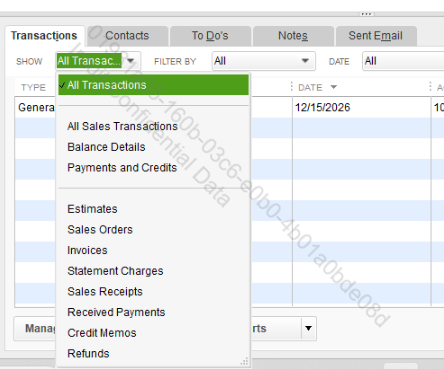
 

image.png


On the other note, you can still manage your memorized deposit anytime if you need to make changes or updates. Here's how to do it:


  1. Press Ctrl + T on your keyboard to open the Memorized Transaction List.
  2. Find the memorized deposit you want to update and double-click it to open.
  3. Make your changes, then Save. QuickBooks will update the memorized deposit automatically.


Feel free to reply to this post if you have further questions or need additional assistance.  

ElykaJen_A
QuickBooks Team

Memorized deposits not showing on customer account

Hi Pennee,

Just checking in to see if the solution we shared worked for you.

Did it fix the issue, or are you still having trouble?Happy to help if you need any more assistance.

Need QuickBooks guidance?
Log in to access expert advice and community support instantly.

Need to get in touch?

Contact us
