Turn on suggestions
Auto-suggest helps you quickly narrow down your search results by suggesting possible matches as you type.
Showing results for
Get 50% OFF QuickBooks for 3 months*
Buy nowhello guys,
i've made transaction as Petty Cash with Employee name how are held the petty cash.
when I display the Quickreport o the petty cash account, want to see splitting lines of each employee
Example:
I've defined Advanced Petty Cash Ledger and this will be used for 2 employee.
Employee 1 - used for 3 purchases.
Employee 2 - used for 2 purchases.
I want the report for Advanced Petty Cash Ledger Quickreport showing
Employee 1
INV# 1
INV# 2
INV# 3
total Usage
Employee 2
INV# 1
INV# 2
total Usage
thank you

I will be glad to offer my assistance, Al.
However, I would appreciate more information to gain a complete understanding of your concerns.
May I know if you have added the employee as a sales rep and selected the EE's name in the invoice? Also, asset accounts don't display bills (AP) and invoices (AR) in the Petty Cash Quick report.
Providing further details would assist me in offering an accurate solution to achieve your goal today.
I'm looking forward to your response. Stay safe!
Thank you, GlinetteC for replying,
I'm using Quickbooks Desktop Enterprise.
for Petty Cash entry, I made the Transfer Funds to Petty Cash Ledger AC.
then when I make purchases made the Write checks as per the invoices the employee submitted.
1. Employee (not showing as the Sales REP.)
2. I'm making the purchase as Write checks
thank you for your guidance.

Thanks for getting back in this thread, Al.
I can clarify things for you on why Invoices won't show up on the Employee Quickreport.
Petty cash is a small amount of cash a company keeps on hand to cover small expenses. It is also known as a petty cash fund. This money is used for minor or incidental expenses.
Hence, the Employee account doesn't include invoices. I can provide the steps so you can see what transactions are included in the Employee's account.
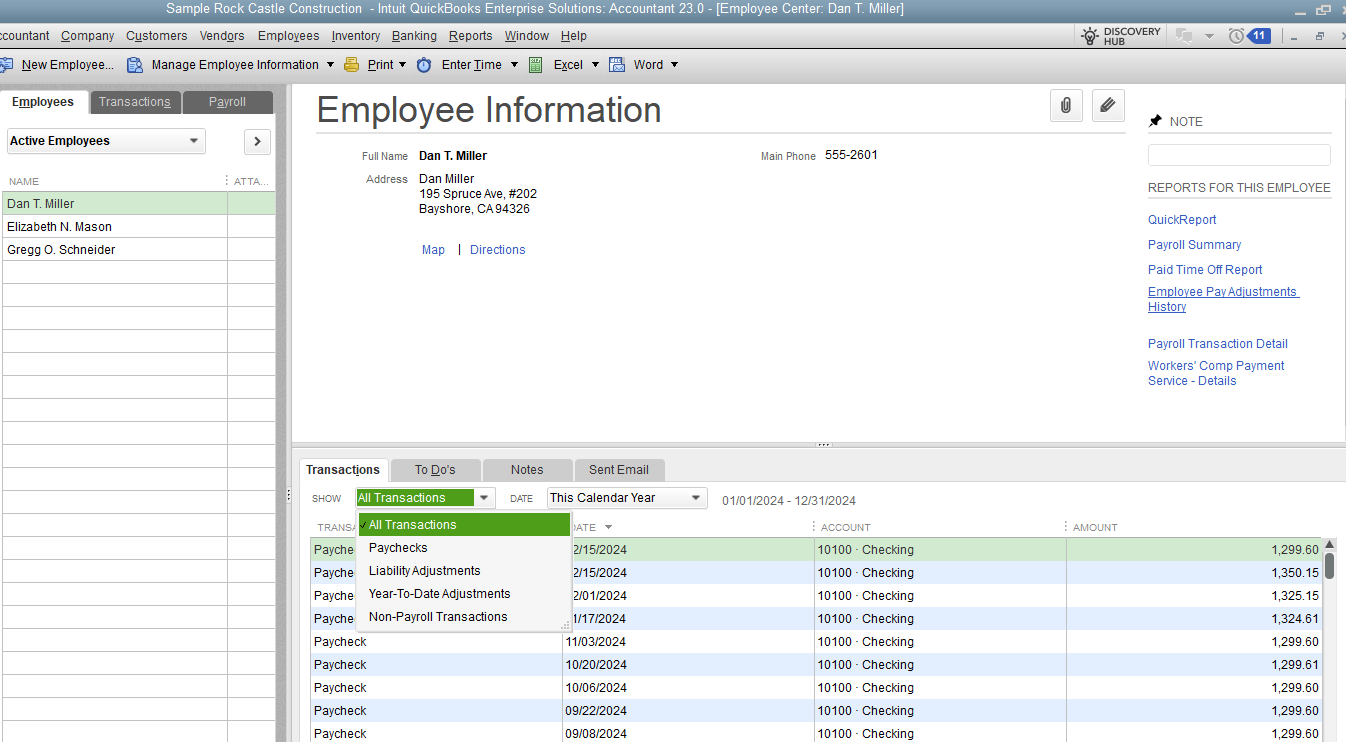
However, you can use the Custom Summary and Custom Transaction Detail reports to create virtually any report in QuickBooks. These reports use different combinations from the Display and Filters tab in the Modify Report window.
Also, please know that QuickBooks Desktop also uses a concept called Source and Targets to apply accounting principles and processes.
For more information about reports in QuickBooks Desktop you can check out this link: Understand reports.
Moreover, I'm adding this article about customizing reports in QuickBooks Desktop for future reference: Customize reports in QuickBooks Desktop.
You can count on me for help with managing reports in QuickBooks Desktop. Let me know if you need anything else. Stay safe and hydrated. Thank you!
Thank you for explaining, EMAN_E,
I'll tell you our method of maintaining Petty Cash.
1. Pay to Employee (Petty Cash Holder) Amount as Advance (keep it as Treasure)
2. the Employee must submit the invoice to verify to reimburse the amount used.
3. pay the invoice back to petty Cash holder.
so, we need to have the balance report showing how much he owe to company and how much he used.
for example:
$1,000 pay to employee (we'll have ledger AC for this as bank type - Named : Petty Cash IT Dept.)
(will be like Banking > Transfer Fund)
the employee will use the petty cash as per the stuff he must buy.
entry as per the accountant will be Banking > Write Check > Pay to Vendors name
Account will be from Petty Cash IT Dept.
what if there are 3 employee use the same petty cash how we could show their names?
or
is there any better way to handle this in other way? how to process it?
1. advance to head of department Petty Cash IT Dept.
2. pay by employee X name
3. reimbursement to the same account ledger
appreciate your endless help
Hassan,
Thank you for getting back, @AlMuhanna. I'm stepping into the thread to share some additional resolutions to check the balance using petty cash for 3 employees in QuickBooks Desktop (QDBT).
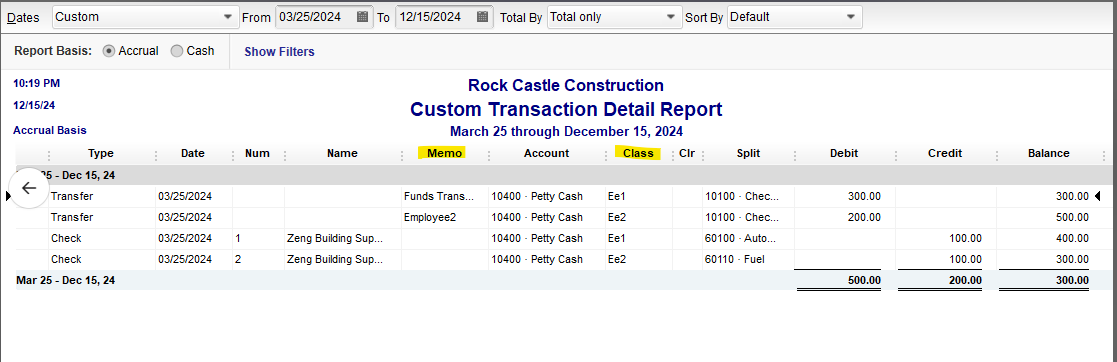
You can use Memo or Class to manage petty cash with multiple employees using the same fund. This provides a quick reference for identifying who made the expenses.
Here's how:
Once done, you can a Custom Transaction Detail Report and filter the report for Petty Cash to show the balances. Please see the screenshot below for visual preferences.
In case you want to delete an account from the Chart of Accounts, you can check out this article as your reference: Add, edit, or delete accounts in QuickBooks Desktop.
Additionally, you might want to understand more about the accounts you'll use to categorize your transactions on everything from sales forms to reports to tax forms. This article will provide you the detailed information: Learn about the chart of accounts in QuickBooks.
If you have any other follow-up questions about your account, let me know by adding a comment below. I'm always here to help. Cheers for more success


You have clicked a link to a site outside of the QuickBooks or ProFile Communities. By clicking "Continue", you will leave the community and be taken to that site instead.
For more information visit our Security Center or to report suspicious websites you can contact us here


