Yes, there is, @ReneeE. Let me share the steps to generate a custom report in QuickBooks Desktop (QBDT) that displays the necessary details.
We can create a custom summary report to see the income statements that show the profitability of some aspect of your business you need.
Here's how:
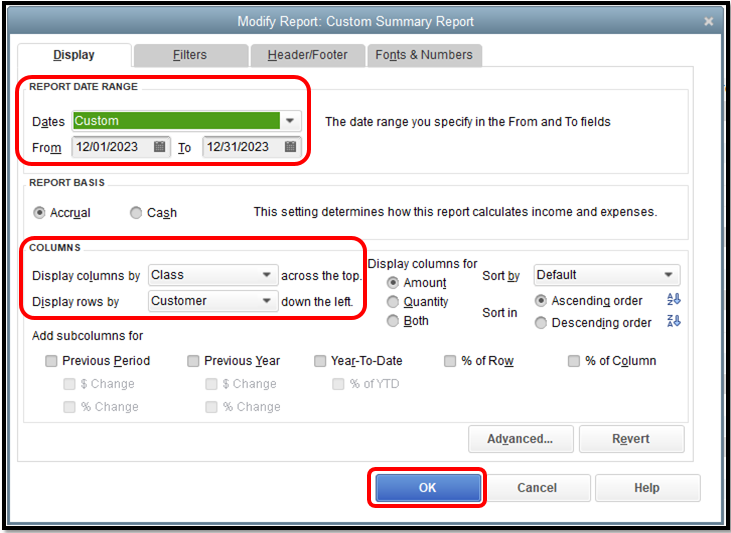
- Go to the Reports menu and select Summary from the Custom Reports.
- In the Display columns by section, choose Class.
- In the Display rows by section, select Customer.
- Adjust the date to the specific month you need to track your income.
- Make necessary customizations, then tap OK once done.
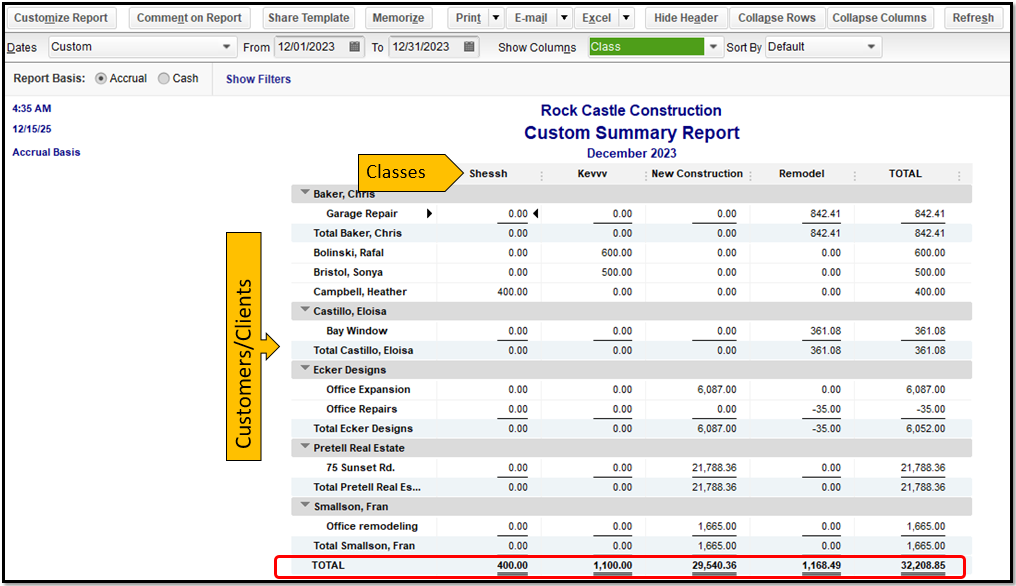
Here's a sample screenshot of the result of this customization:
You can also visit this article to learn more about the process of personalizing reports: Customize reports in QuickBooks Desktop.
Just in case you want to save the personalization settings of the report, check out this article for the detailed steps and information: Create, access, and modify memorized reports.
I'll be around to help if you have any other concerns with managing your QBDT reports. Just let me know by leaving a reply below. Keep safe.




