Hi there, Doris8,
Thank you for reaching out and sharing details about your credit card situation. I appreciate your proactive approach in ensuring that your financial data is secured.
To resolve your situation, could you please specify the exact issue you're experiencing with your old card and the newly issued card? Understanding the specific problem will help us provide you with the most effective solution.
In the meantime, if you need assistance with disconnecting your old credit card from QuickBooks Online to prevent new transactions from syncing and to maintain the integrity of your financial data, here are the steps you can follow:
- Navigate to Transactions, followed by Bank Transactions.
- Choose the specific bank account by clicking on its tile.
- Click on the pencil icon to edit, then select Edit account info.
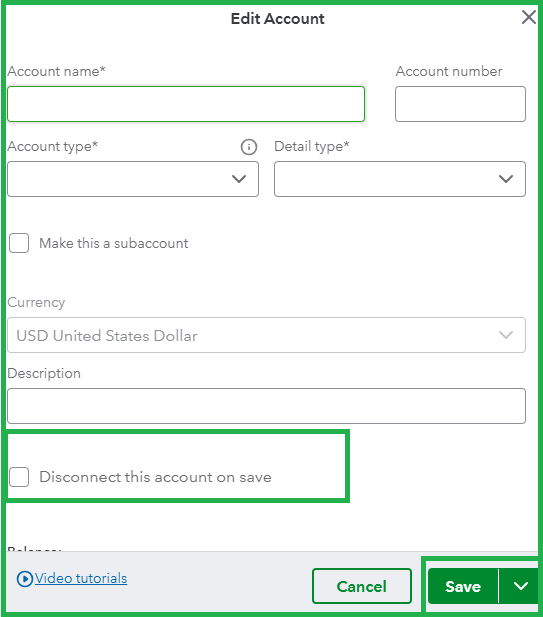
- Check the Disconnect this account on save option in the Edit Account window, then select Yes to proceed.
- Click Save and Close to finalize the changes.
For reference, please see the screenshot below:
Additionally, if you’re looking to connect your new credit card to QuickBooks, I recommend referring to this detailed guide for step-by-step instructions and helpful tips: Connect bank and credit card accounts to QuickBooks Online.
Moreover, upgrade your financial management with the support of our QuickBooks Live Expert Assisted team. These professionals optimize your financial tasks and provide tailored advice that fits your business's unique situation. A more promising financial future is only one click away.
Also, here’s an article you can check out and save for tips on organizing and ensuring your entries are consistent with your credit card statements:
I'll be keeping an eye out for your response, Doris8. If you have more questions or need further assistance, feel free to comment below. I'm here to provide any additional information or support you need.




