Turn on suggestions
Auto-suggest helps you quickly narrow down your search results by suggesting possible matches as you type.
Showing results for
Get 50% OFF QuickBooks for 3 months*
Buy now
This isn’t the experience we want to leave to you, @userID67.
If you’re currently managing your bank transactions, please know that QuickBooks automatically suggests categories to simplify and streamline processes. You can disable the Enable suggested categorization feature to prevent this issue in the future.
Here’s how:
For your existing transactions, you can manually categorize them in the meantime to put them into the right accounts.
You also mentioned “ai.” Are you using a third-party app to automatically categorize transactions? If so, then it would be best to reach out to their support team for assistance and resolution.
I’m adding this reference to make sure everything is balanced and accurate: Learn the reconcile workflow in QuickBooks. It contains steps to modify completed reconciliation and ways to correct balance issues.
Please don’t hesitate to visit us here if you have any other concerns besides categories. I’m always available to help.
YES, I don't remember enabling this feature???? But I am trying to get accounting finished for taxes and it keeps trashing my bank transactions, recategorizing whole batches of transactions that are unrelated and not selected. What a disaster to role this functionality out at TAX TIME
Any BTW, there is no Banking menu in Quickbooks Online.
Hello there, @TierOne1.
I'll help you locate the Banking menu in the new layout of QuickBooks Online.
To turn off the suggested categorization feature, you can switch to the Accountant View to see the banking menu. You can change it from the Gear icon and click the Switch to Accountant view at the bottom. See the screenshot below.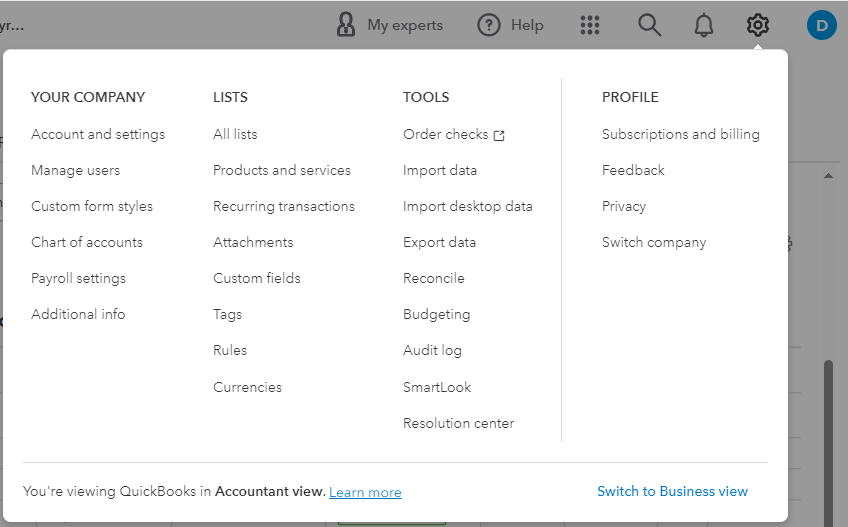
Then, follow the steps provided by my colleague above to turn off the automatic suggested categorization.
For future reference, you can read this article to help you in running reports in QuickBooks Online. I'm always here to help. Have a great day.


You have clicked a link to a site outside of the QuickBooks or ProFile Communities. By clicking "Continue", you will leave the community and be taken to that site instead.
For more information visit our Security Center or to report suspicious websites you can contact us here


