Hello there, @billr1. When you filter the Profit and Loss report by specific customers, QuickBooks only shows income transactions linked to those customers as well as expenses that have those customers explicitly assigned in the Customer/Project field.
Most expense transactions (such as bills and checks) are typically recorded with a vendor, not a customer. Unless you've specifically assigned a customer to each expense—usually for job costing or project tracking—those expenses won't appear when you filter by customer.
To fix this, open a few of the expense transactions that aren't showing. Do they have the customer name filled in the Customer/Project field, or are they only linked to a vendor?
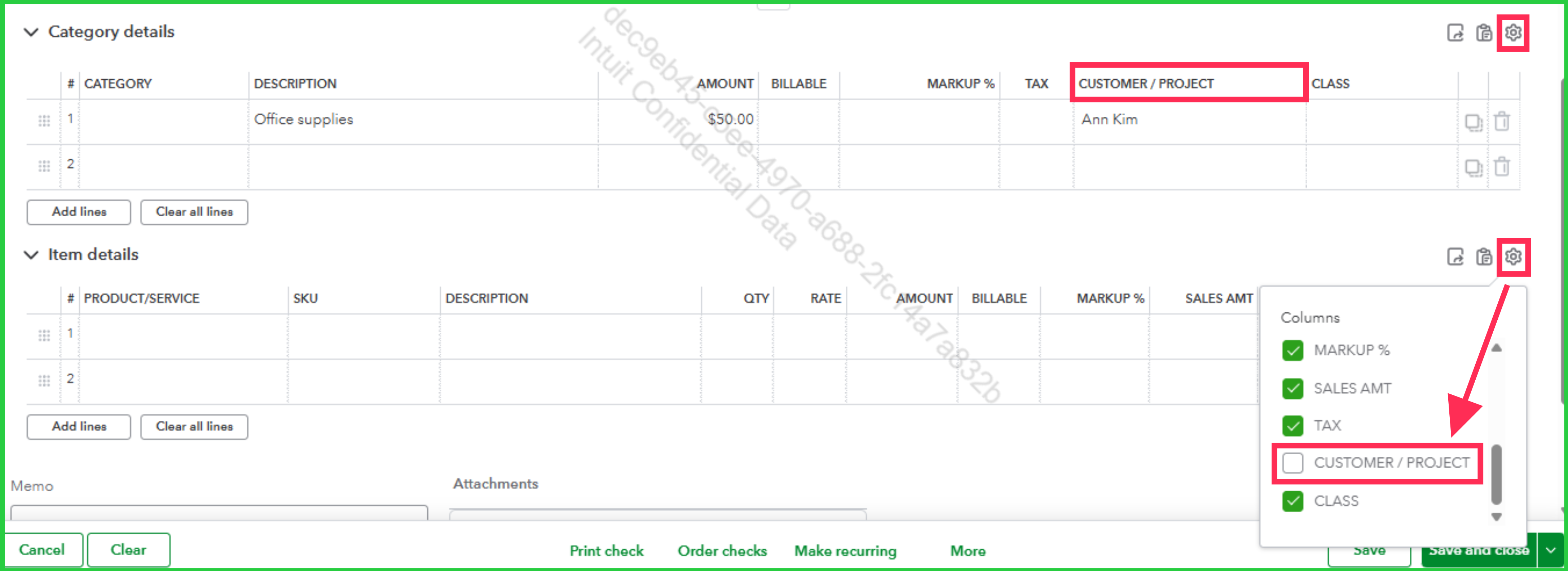
If the Customer/Project field doesn't appear on the transactions you opened, follow these steps:
- Within the expense transaction, click the Gear icon for either the Category or Item details.
- Enable the Customer/Project column.
- Select the specific customer, then click Save and close.
If you need to see all expenses regardless of customer assignment, you'll want to re-run the report without the customer filter. You can then identify the expenses that may not have a customer assigned to them.
Should you have any other concerns, feel free to leave a message in the thread.




