Good day, @viktorianug. I'll share some information about running an AR/AP Aging report for a multi-company in QuickBooks Online (QBO).
Currently, there's no integrated way to run the aging report for multiple companies in QBO. In the meantime, we can export the reports into Excel. From there, you can edit or combine the aging reports from each of your companies.
Here's how:
- From the left navigation pane, select the Reports menu.
- Look for the report you want to pull up.
- Click the Export icon located at the top of the report. Then, select Export to Excel.
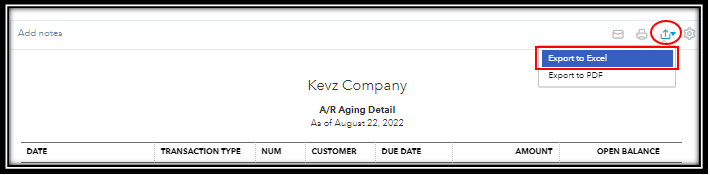
- Save the file to your device where you can easily locate it.
While I’m unable to recommend an app, I suggest looking for another third-party app from your QBO account that lets you run AR/AP aging reports for multiple companies. Here's how:
- From the left panel, click Apps.
- Go to the Find Apps tab.
- Use the search bar and enter the keyword to look for an app.
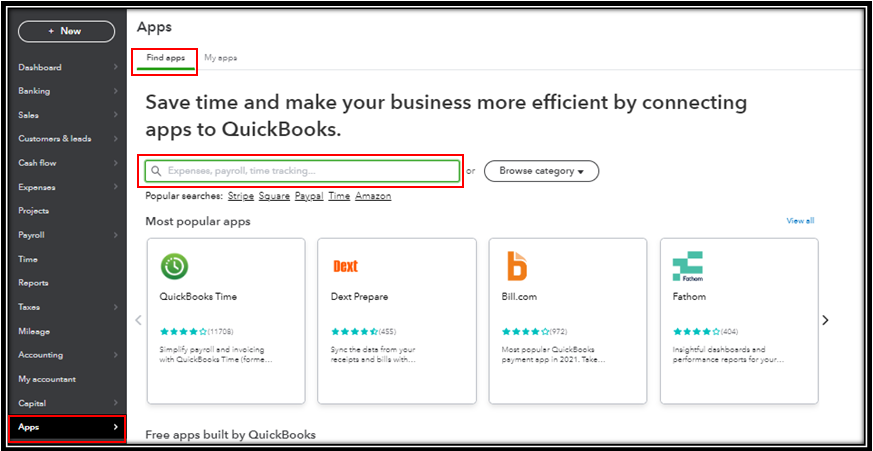
- Choose an app from the list.
Additionally, if you want to learn more about the process of customizing reports, kindly refer to this article: Customize reports. Then, if you want to memorize the report you've customized, feel free to check out this article for the detailed steps and information: Memorizing reports.
Keep me posted if you still have questions or concerns with managing your reports in QBO. I'll be here to lend a helping hand. Have a great day ahead!





