Get 50% OFF QuickBooks for 3 months*

Buy now
cancel
Showing results for 
Search instead for 
Did you mean: 
Announcements
Simplify payday and set payroll to run automatically on QuickBooks. Explore QuickBooks Payroll
kkramZ
Level 2

QBO Report for Positive Pay

Has anyone figured out an easy way to create a report on QBO for a Positive Pay Report for your bank? Or had success with a third-party app? All the discussions I found are several years old. I can't believe QB hasn't created a report by now! The bank needs the check date, number, payee, and amount. The issue with the QBO reports is that I need the "Name to be Printed on Checks" because sometimes a company has a DBA or something like that so I issue the check to a different name. The other issue is that the amount needs to be a positive number and QBO reports always show check amounts as a negative/debit amount.

2 Comments 2
Jv_D
QuickBooks Team

QBO Report for Positive Pay

Hi there, kkramZ.


I understand how valuable it would be to have a feature for creating Positive Pay Reports directly in QuickBooks Online (QBO). While this option isn’t currently available, I agree that it would be a great addition to help many users.


You can share your feedback with us to help improve the product. Here's how:


  1. Go to the Gear icon.
  2. Select Feedback.
  3. Enter your suggestions and feedback.
  4. Click Next and choose Feedback as the category.


Your feedback will be sent directly to our development team, who reviews customer suggestions for future updates and features.


As an alternative, you can export the data and manually edit it in Excel, like preparing data for Positive Pay, when specific customizations, complex edits, or formatting adjustments cannot be done directly within QBO.


Here's how:


  1. Go to Reports.
  2. Search for Check Detail and open it.
  3. Set the date range and use Customize to include only necessary columns (e.g., Check Number, Payee, Date, and Amount).
  4. Click Export at the top right and select Export to Excel.
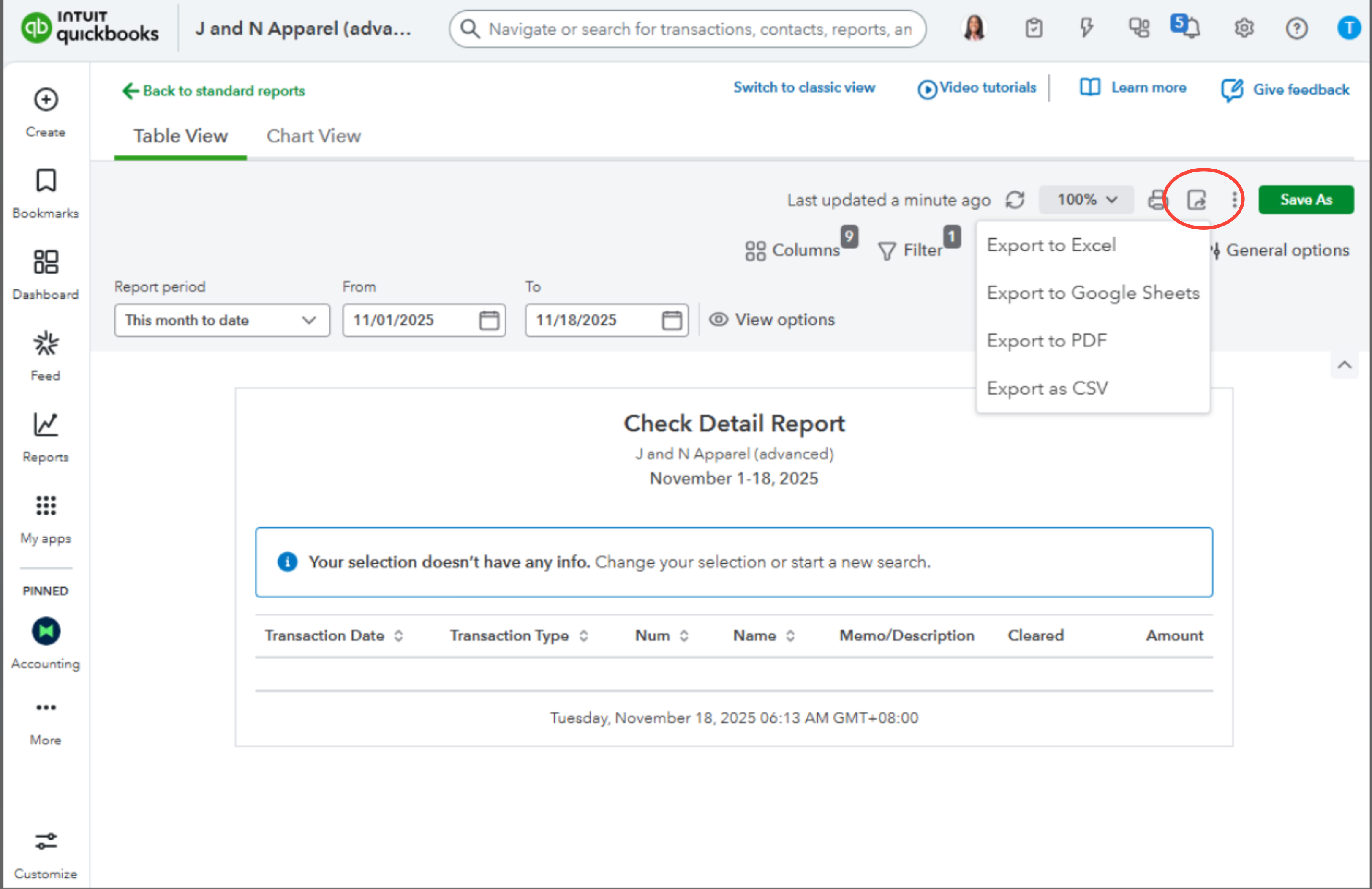


You can also use a third-party app for your Positive Pay.


If you have further more questions, click the Reply button below.

ArnoldJohn_C
QuickBooks Team

QBO Report for Positive Pay

Hi there, @kkramZ.

I just wanted to follow up to check if the resolution we provided helped resolve your issue.

Please let us know if everything is now working as expected or if you’re still experiencing any problems. We’ll be glad to assist further if needed.

Need QuickBooks guidance?
Log in to access expert advice and community support instantly.

Need to get in touch?

Contact us
