Welcome to the QuickBooks Community, bscramit. I've got different steps to change email in QuickBooks Self Employed.
When creating and sending an invoice in QBSE, the customer's information is always manually entered. If you mean changing the email address where the customer receives entry notifications, yes, you can do so next to their name. I've included a screenshot for your convenience.
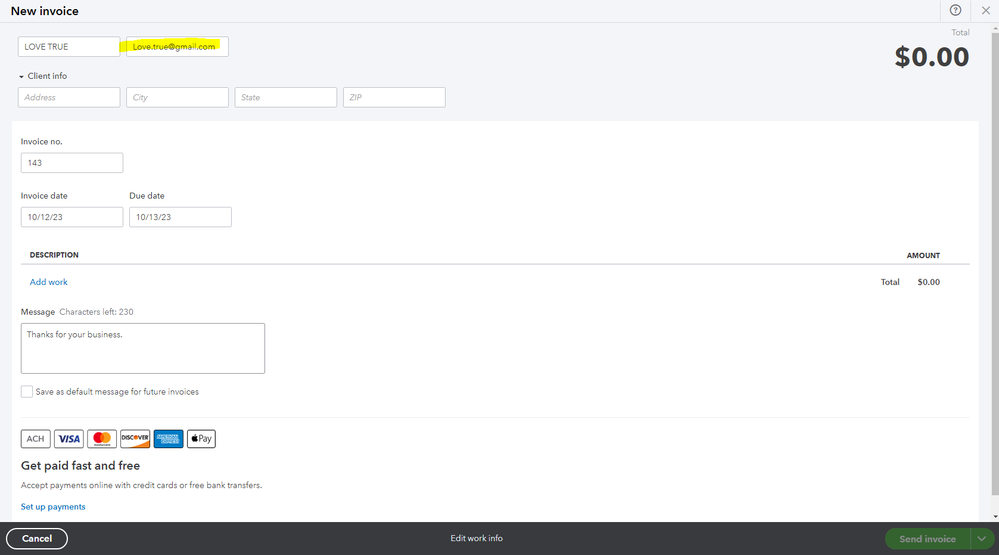
If you're referring to updating the business email address where your customers can see this when you send invoices, you can go to the Edit work info section. This also appears as where the emailed entry came from and is used to notify you after the customer has paid the transaction.
Here's how:
- Go to the Invoices menu on the left panel and select Create invoice button.
- Click Edit work info at the bottom.
- Update the email on the Email field, then select Save.
Lastly, refer to this article if you need various details on how QBSE tracks your business income and taxes to ensure you have accurate data for filing: QuickBooks Self-Employed Overview.
If you're referring to something else, please let me know by clicking the Reply button and leaving a comment below. It'll always be my pleasure to help you, bscramit. Take care and stay safe!




