I can guide you on how to export memorized report list to Excel, @Border Collie Boy Part 2.
I’m glad to see you on the Community page. QuickBooks provide options to achieve your business needs.
You can create a new worksheet for Excel or create a comma-separated values (.csv.) file format when exporting a memorized report in QuickBooks Desktop. Let me show you how:
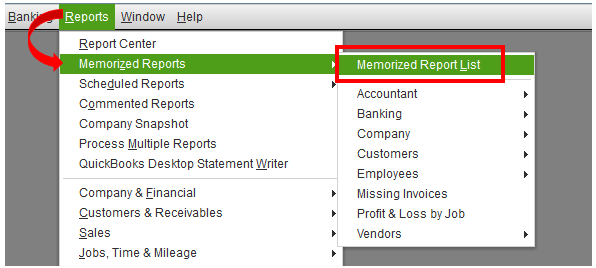
- Go to the Reports menu.
- Choose Memorized Reports, then Memorized Reports List.
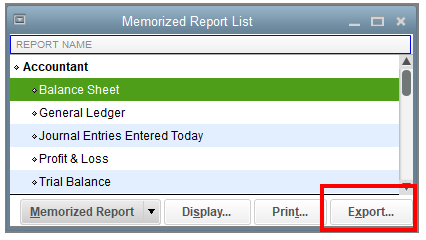
- Select a report name from the list.
- Click the Export button.
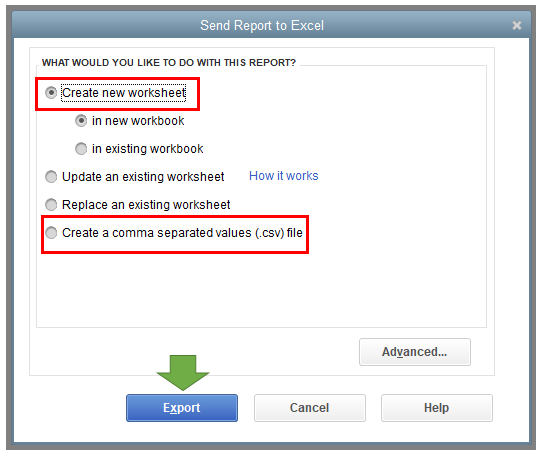
- Select either Create a new worksheet or Create a comma separated values (.csv.) file.
- Press Export.
You can also modify them before exporting. Just use this reference to customize a report.
Visit this link here to learn more on how to create access and modify memorized reports in QuickBooks. It also includes instructions to resolve possible issues when memorizing them.
Leave me a message below if you have additional questions or concerns about reports. I’m always here to help you out. Keep safe!




