Hi there, @david200.
Allow me to help settle this transaction so you can get back to business.
You can delete the partial payments in QuickBooks Online, and then create a new one. Let me show you how:
- Go to the Sales menu.
- Choose All Sales.
- Locate the invoice and select it.
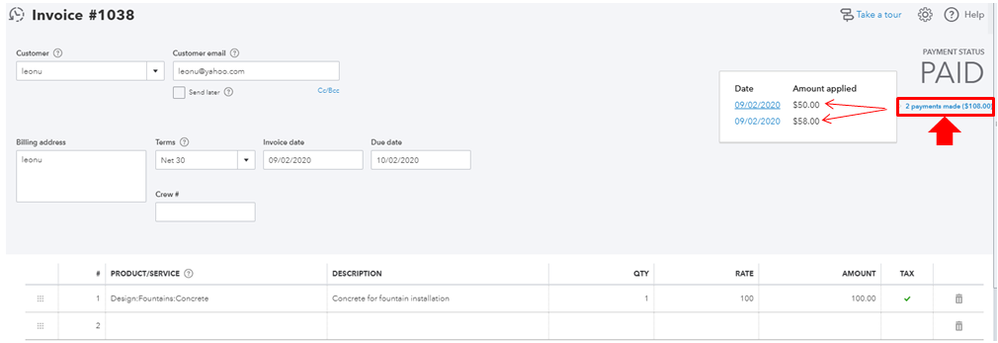
- Under the status PAID, click 2 payments and select each.
- Click More at the bottom of the page, then select Delete.
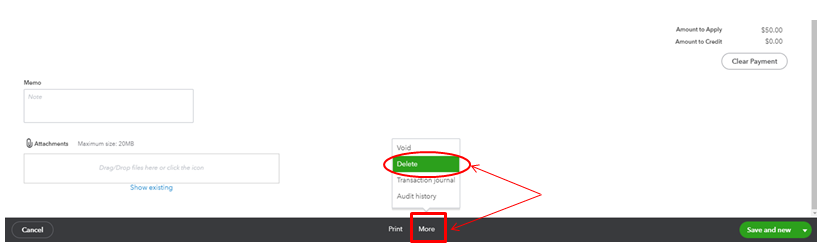
Doing this, the status of the invoice will get back to unpaid. Then follow these steps below to record the partial payment:
- Click the + New button.
- Choose Receive Payment.
- Enter the customer name.
- Select the invoice by putting a checkmark.
- On the Payment column, enter the partial payment amount.
- Click Save and close.


The status of the invoice will automatically change to Partial after following the steps given above. To get in-depth information about the process, you can refer to this article: Record customer payment in QuickBooks Online.
You can run the Transaction List by Customer report to track this kind of records in the system. This gives you a clearer presentation of your sales and customers.
Keep me posted if you have other questions with QuickBooks. I'm always here to help. Keep safe.




