I know a way to stop those time entries from showing up on your recurring invoices, Jared.
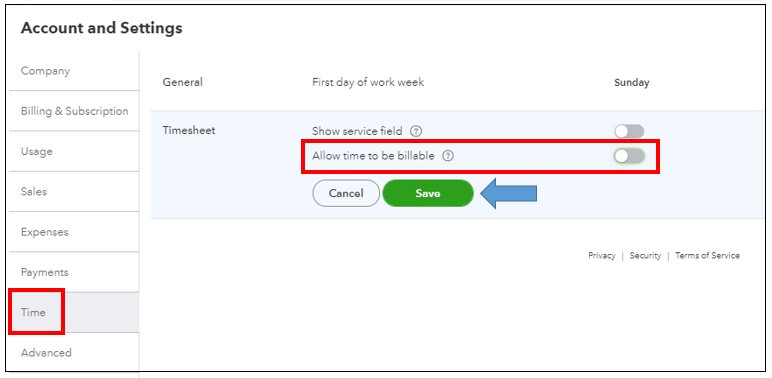
To do that, you’ll want to turn the Allow time to be billable feature off under Timesheet. I’m glad to show you the steps.
- Log in to your QuickBooks Online (QBO) account.
- Select the Gear icon, then choose Account and settings.
- Go to the Time tab.
- Click the Pencil icon under Timesheet.
- Toggle the button in the Allow time to be billable to deactivate the feature.
- Press Save then Done.
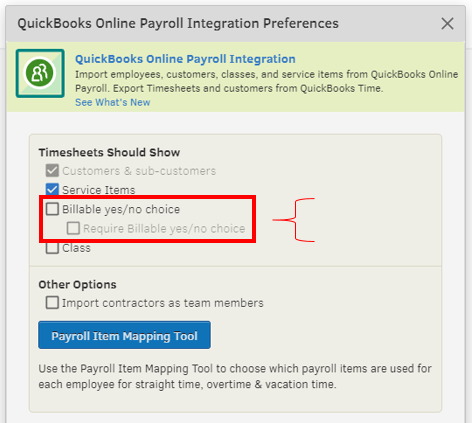
If you have QuickBooks Time (TSheets) connected to your QBO, you’ll want to uncheck the Billable options in the Preferences. This way, your teams won’t be asked to select a customer or project before they can clock in.
Here’s how:
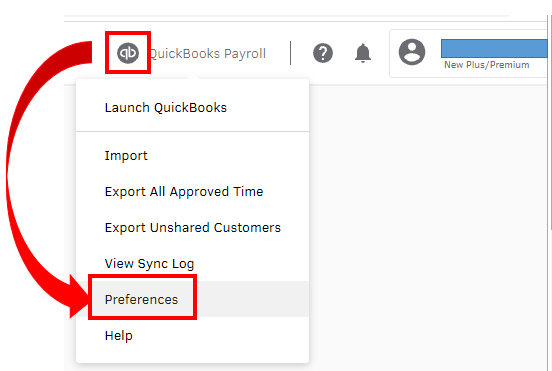
- Within QuickBooks Time, select QuickBooks.
- Click Preferences.
- Uncheck the Billable and the Require Billable Yes/No options.
You can use this guide if you'd like to modify your recurring transaction template in QuickBooks:Edit a recurring template.
If you have any other questions or concerns in managing your transactions, just let me know. I’d be glad to assist you further. Always take care!




