Welcome to the Community space, @HBUHSD.
You can create a new invoice template and make it default. This way, you can't get the standard template when creating an invoice. Let me show you how.
- Go to the Gear icon and select Custom Form Styles.
- Click the New Style button and select “Invoice” from the drop-down.
- Modify the necessary details of your template.
- Select Done.
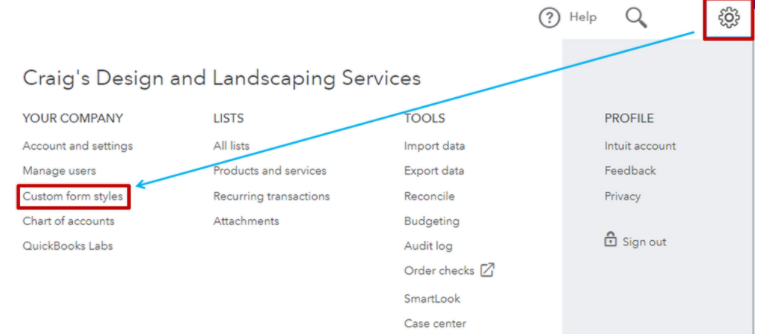


Then, make the invoice template as master default. To change the default form, click the Arrow icon next to the form you want to designate and select Make Default.

You can refer to this article for detailed instructions on how to customize invoices: How to Customize Invoices in QuickBooks Online.
Once done, you can now create an invoice using the default template. For more details on how to create and send invoices, check out this article: Create invoices in QuickBooks Online

However, if you still need to contact our Customer Support Team. Just click the Help (?) icon and request a callback from them. You can check out this article for reference: QuickBooks Online Support.
Additionally, you can use the Import style feature which allows you to create sales forms that match your brand's style. Simply, personalize them to suit your needs. Take a look at this article, for more: Import custom form styles.
Let me know if there's anything else you need with customizing an invoice template pr any QuickBooks related. I'm always around whenever you need help.




