@Acalsup, I'm delighted to welcome you to the Community. Thanks for posting your detailed concern in our forum. It's my pleasure to assist you in categorizing your vehicle purchase in QuickBooks Online.
You can categorize the cost of the vehicle as an expense of $15,000 while still indicating that it has a value of $25,000. Let me show you how:
- Select the + New button.
- Under VENDORS, choose Check.
- In the category details, select Vehicle expenses, then type in 25,000.
- Add another category to offset a value of -10,000. Contact your accountant if you're unsure about which category to utilize.
- Hit Save and Close.
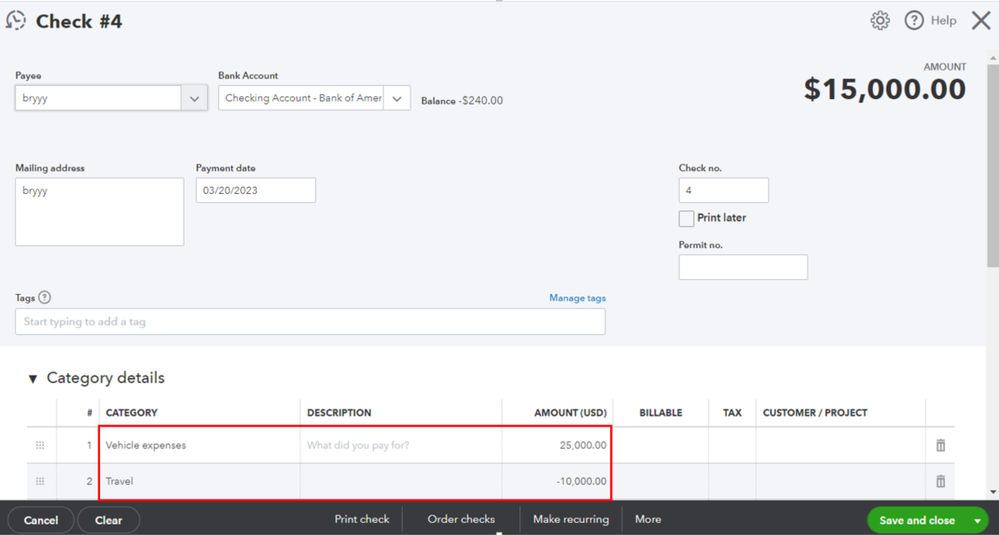
Once done, you can then categorize the check as worth $15,000.
If you want to use bank rules to categorize future transactions from your bank, please refer to the following article: Set up bank rules to categorize online banking transactions in QuickBooks Online.
Please drop by again if you need further assistance categorizing your bank transactions in QuickBooks Online. We're always here to lend a hand. Have a nice day!




