Turn on suggestions
Auto-suggest helps you quickly narrow down your search results by suggesting possible matches as you type.
Showing results for
Get 50% OFF QuickBooks for 3 months*
Buy nowI called support and they don't know how to do that. It must be possible !
Anybody have some ideas ?
Thanks all,
Denis

Hello there, @denisf. You can print multiple invoices using the Batch Actions feature.
Before you begin, make sure to filter the desired invoice date range before selecting the invoices you'd like to print.
Here's how to print multiple invoices:
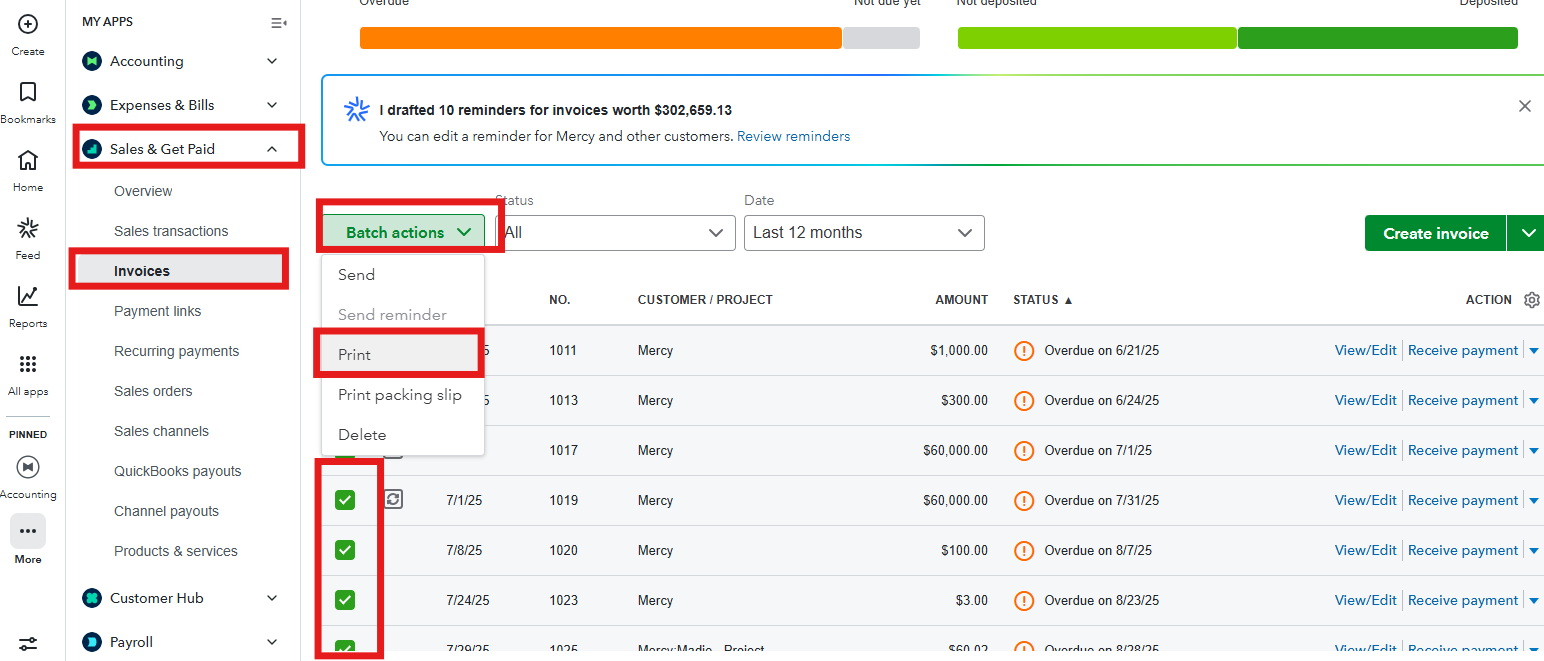
Also, consider checking out our QuickBooks Live Expert Assisted team. They can help you manage your invoices, transactions, and bank reconciliation.
We're always here to help you if you have any other concerns.
Hey Clark,
Thanks for the reply. What I miss having though is this:
1. I can only do one year at a time, unlike with other QBO screens where one can do a custom date range.
2. When one has a lot of clients and invoices it would be *much* easier to have a filter on client name like on other QBO screens. Right now I have to sort by client then dig through all the invoices to find my client's.
Am I missing something ?
Thanks,
Denis
Hi, @denisf. I appreciate you sharing additional information about printing invoices for a specific client.
Currently, the Invoices page allows only a one-year date range at a time and there is no option to filter by client name.
However, you can still filter and print all invoices for a specific client by going to their profile. Please note that you can only custom dates one year at a time.
Here's how:


For additional features such as custom date range and client name filter on other QuickBooks screen like the Invoices page, I encourage you to share your ideas by submitting a feedback to our product engineers.
Keep us posted if you have any other concerns or additional questions.
Hi, @denisf .
I just wanted to follow up to check if the resolution we provided helped resolve your issue .Please let us know if everything is now working as expected or if you’re still experiencing any problems. We’ll be glad to assist further if needed.


You have clicked a link to a site outside of the QuickBooks or ProFile Communities. By clicking "Continue", you will leave the community and be taken to that site instead.
For more information visit our Security Center or to report suspicious websites you can contact us here


