Welcome to the Community, abrauda.
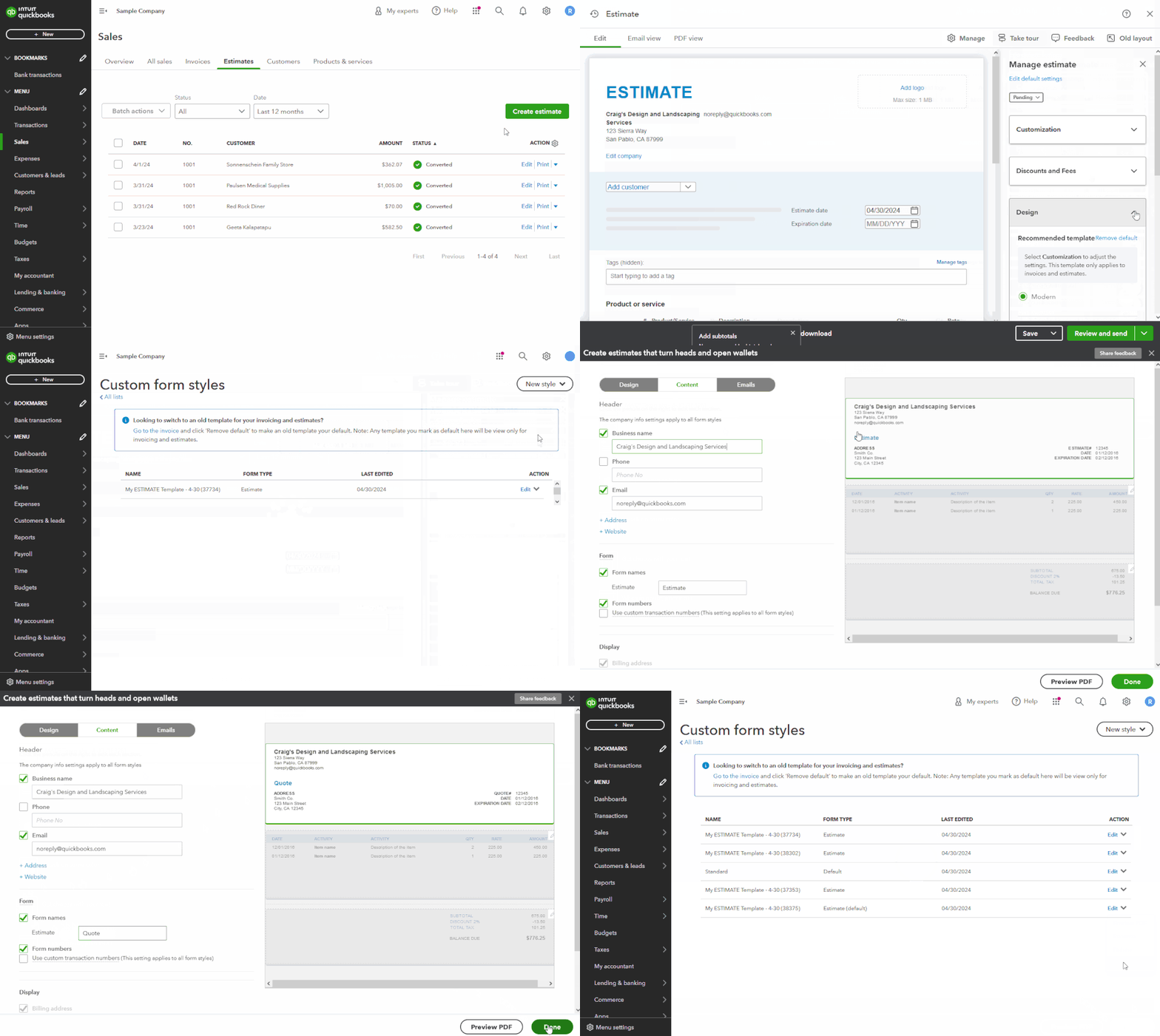
You can customize estimate templates to change your form title to something other than "Estimate".
Here's how:
- While creating or editing an estimate, click the Manage option.
- Use your Design drop-down.
- In the Other templates (view only) section, hit Manage.
- Choose to create a new estimate style, or to edit an existing template.
- Access your Content tab and click the header area of the form.
- For your Form names option, change the default ("Estimate") to something you'd prefer it to say.
- When you're finished, select Done.
- Confirm your appropriate template is set as the default. You can do so by using your Drop-Down Arrow (▼) icon in each template's Action column. If it isn't the default already, it will have a Make default option displayed.
I've also included a detailed resource about customizing sales forms which may come in handy moving forward: Customize invoices, estimates, & sales receipts
Please don't hesitate to send a reply if there's any additional questions. Have a great Tuesday!




