Hello, Kelly.
I'll shed some light on the error message, and I'll also help you take care of the duplicated inventory items in QuickBooks.
We're unable to merge inventory items as this will throw off the asset and other inventory-related accounts in QuickBooks. So, we can only merge non-inventory items and services at this time.
What we'll want to do is to simply inactivate those duplicate inventory items. Here's how to do it:
- Go to the Products and Services page.
- On the list of items, find and check the duplicated items.
- Click the Batch actions button.
- Select Make inactive.
- Proceed with Yes on the confirmation screen.
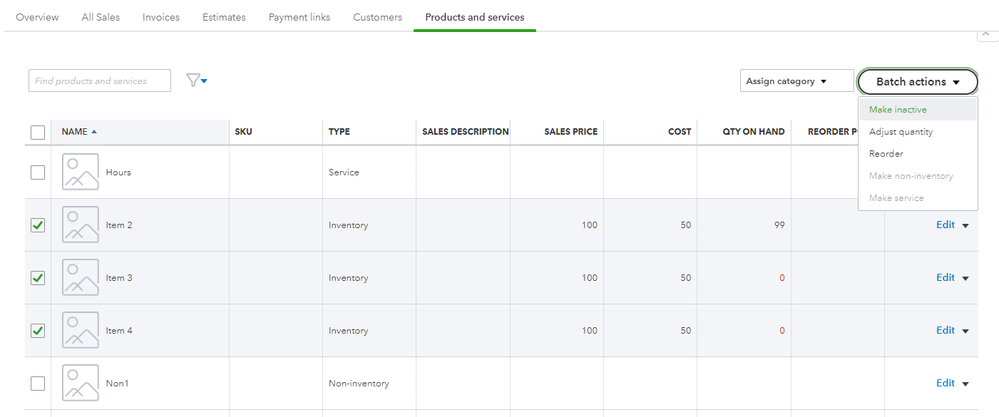
Do this until all of the duplicate items have been inactivate from the list.
Aside from services and non-inventory items, you can also merge lists such as accounts, customers, and vendors. Check this article out if you need more details: Merge duplicate accounts, customers, and vendors in QuickBooks Online.
Need help in getting alerts if there are inventory items with low or out of stock status? We have an article to guide you with the process: Get alerts for low or out of stock products.
Let me know if you have other questions about managing your inventory in QuickBooks. Want to record your sales and other entries? Lay down the details below and I'll gladly assist you.




