Welcome to the Community, @robert160.
I know how convenient it would be for you to be able to delete all of these transactions at once.
Deleting transactions in bulk is unavailable in QuickBooks Online (QBO) yet. You'll have to delete transactions one at a time. With this, I recommend sharing your ideas with our developers. They will take a look at your inputs and consider them for product developments or future improvements.
Here’s how:
- Go to the Gear icon.
- Select Feedback.
- Enter your product suggestions, then click Next.
You'll want to track your suggestions through this website. You can also visit our blog to keep up with all of our recent events and developments.
For now, we can exclude the duplicate transactions to permanently remove them from your QBO.
Here's how:
- Go to the Banking or Transactions menu, then select the Banking tab.
- Select the For Review tab.
- Tick the box for each transaction, then click Exclude.
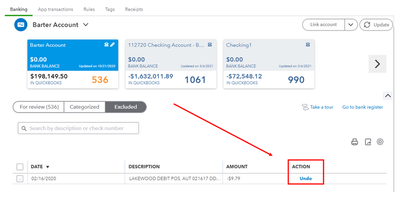
Please see this article for more details about excluding bank transactions in QuickBooks Online (QBO): Exclude a bank transaction you downloaded into QuickBooks Online.
Additionally, you can use a third-party tool to remove them easily in the system. There are excellent apps located in our App Center. You can also use your QBO account to find it.
Here’s how:
- Go to the Apps menu.
- Enter Batch Deleter or Bulk Deleter in the search field.
- Select the suggested apps to view them.
When everything is all in place, you can confidently reconcile your accounts. For guidance, feel free to check out this resource: Reconcile an account in QuickBooks Online.
I'm just around the corner to help if you have any other questions about handling transactions. Don't hesitate to post a reply below. Have a wonderful day!




