Turn on suggestions
Auto-suggest helps you quickly narrow down your search results by suggesting possible matches as you type.
Showing results for
Get 50% OFF QuickBooks for 3 months*
Buy nowI would like to have a report that shows gross margin for each individual sale. I am currently using the Sales by Customer report that lists each sale, the customer, the item, the quantity, sales price and total for that item. I would like to have the COGS for that item and then the gross margin for that item for that sale added to the report. Can this be done?
Thank you!
Michelle


Welcome to the Community space, @Oasis2.
Let me help you obtain a report that shows all the data you’ve mentioned above in QuickBooks Desktop (QBDT).
You’re correct about running the Sales by Customer report to pull up sales transaction data. Since the option to run a report with these data together with the COGS and the gross margin for every item is unavailable, we can utilize the Export option to export a report and collate the data needed.
To acquire the COGS and gross margin for the item, we can run a Sales by Item Summary report.
Afterward, we can then export the two reports into excel. Here’s how:
Once done, you can manually edit your data and collate the two reports to obtain all data in one report.
Moreover, you can also customize the reports to show your preferred data: Customize reports in QuickBooks Desktop
Furthermore, I added an article for your reference when importing and exporting data in QuickBooks Desktop.
If you have further questions about running reports, you can always press the reply button to post them here. Have a good one!
Thank you this is helpful. Is there a way to make an advanced report that would have all this information so I would not have to export and merge the two reports?
Thank you!
You're most welcome, @Oasis2. I'm glad to know that the steps provided by my colleague help achieve your goal. So now I'm here to discuss further info about doing an advance report to show all the details you need.
In QuickBooks Desktop (QBDT), you can only have a report that contains sales transaction data along with COGS and the gross margin for each item by exporting and modifying them using Excel. The option to combine them within the program is unavailable.
To request the addition of this feature, I highly recommend sending feedback to our product developers. This will help them review the details and be considered in future updates. Here's how:
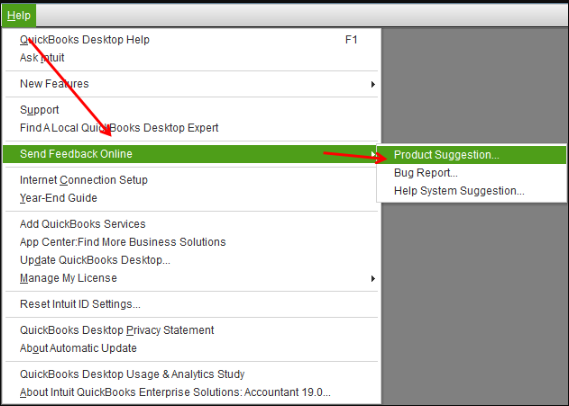
Then, I encourage you to visit our Product Updates webpage to keep you updated with the latest news about your QBDT program.
If you have additional questions or other concerns about managing your reports in QBDT, feel free to leave a reply below. I'm always around to lend a hand. Have a good one and take care.
Thank you for the feedback, I just wanted to make sure I understand your reply correctly. We pay extra for the advanced reporting function in order to make custom reports. Are you telling me that we can not compile a custom report in the advanced reporting function that provides this data? Thank you!
Welcome back to this thread, @Oasis2. Thank you for providing additional details of your concern. Allow me to chime in and further guide you in creating custom reports using the advanced reporting in QuickBooks Desktop (QBDT).
Currently, the option to create a custom report to include details from two different report is unavailable. You want to consider manually changing the data by exporting it to Excel.
On the other hand, I recommend reaching out to our Technical support team to determine additional options you can take to create a custom report with the data you need.
For future reference, you might want to have an organized overview of your company data by combining reports in QBDT. Feel free to open this article for the detailed instructions: Combine reports from multiple company files.
I'd love to know updates on how the process goes. Don't hesitate to post here again if you have further concerns creating custom reports. I'm always ready to assist. Keep safe and have a good day.
The OP's question was "Are you telling me that we can not compile a custom report in the advanced reporting function that provides this data?"
Your pat-answer post did not answer the question. What is the answer to the question?


You have clicked a link to a site outside of the QuickBooks or ProFile Communities. By clicking "Continue", you will leave the community and be taken to that site instead.
For more information visit our Security Center or to report suspicious websites you can contact us here


