Turn on suggestions
Auto-suggest helps you quickly narrow down your search results by suggesting possible matches as you type.
Showing results for
Get 50% OFF QuickBooks for 3 months*
Buy nowOur travel company works with wholesalers who provide certain services such as booking a tour bus and driver at a destination, whom they will pay themselves. Clients pay us for the trip, and we pay the wholesaler its portion. The wholesaler does not bill us. When we receive that revenue from the client, we book our portion as income and journal the wholesaler's portion to a payable.
When we pay the wholesaler, the payable is reduced, but it shows up on our P&L as an expense, "Unapplied Cash Bill Payment Expense."
Since the cash the wholesaler will receive is just passing through our business, it doesn't seem like it's a business expense for us. Is there a way to pay our wholesalers without it showing up on the P&L as an expense? Or is it correct for both the revenue and corresponding payment to appear on the P&L, even though it's a wash and not really our business' revenue? If it is, should we create a "bill" for those amounts? Many thanks.

It's nice to welcome you here in the QuickBooks Community, @HarmanOT. I'll be happy to guide you on how to properly handle revenue owed to a third party in QuickBooks Online (QBO).
From your scenario, we can create a billable expense so you can charge your customers for the services you incur from the wholesaler. However, please be aware that this feature is currently accessible within Plus and Advanced subscription plans.
If you haven't already, let's enable the billable expense feature in your account. Here's how:
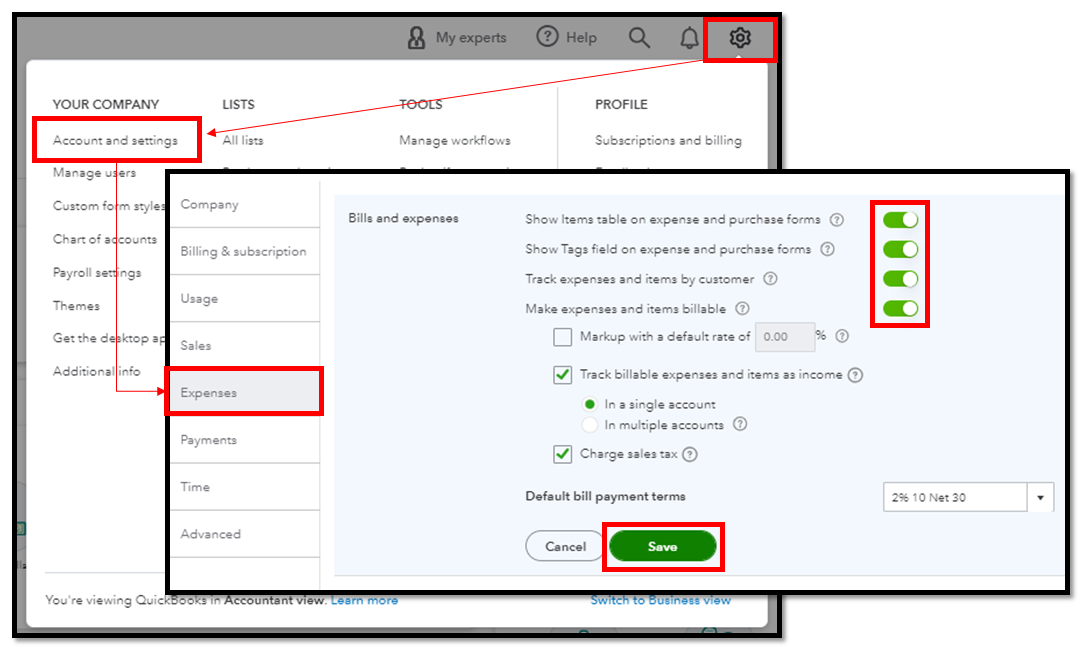
Once done, please refer to these steps on how to bill a customer for your expense from the wholesaler.
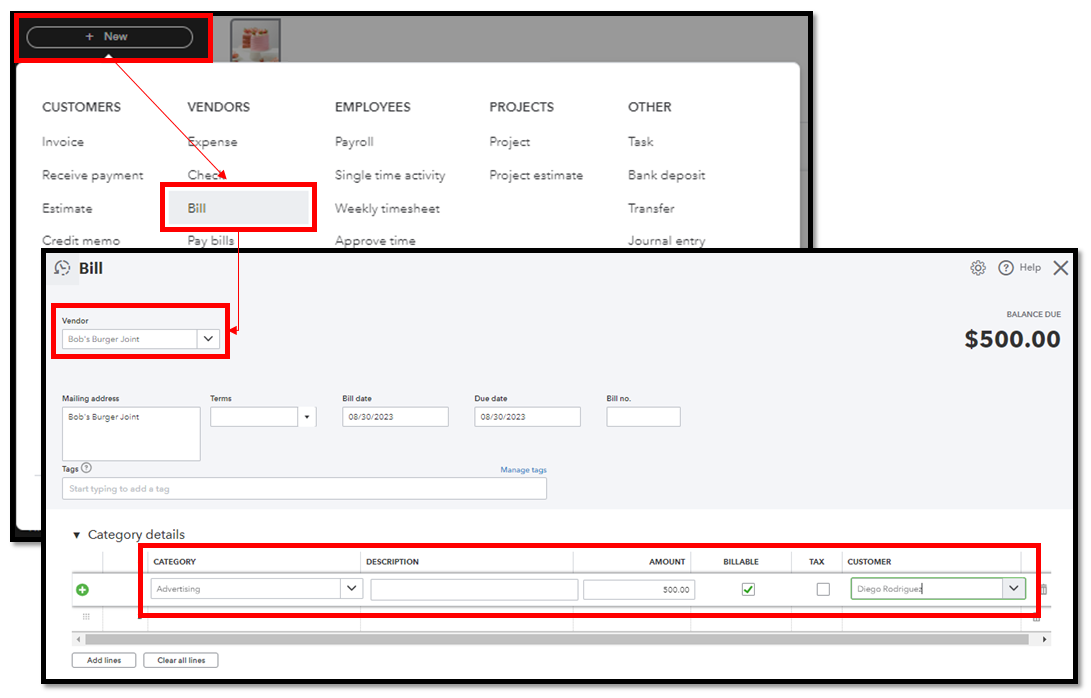
To reimburse the cost, link the billable expense to your customer's invoice. Then, proceed with paying the invoice and the bills so they won't display as open in your reports.
Additionally, customer's billable expenses don't initially reflect on your Profit and Loss statement, as they are not considered business expenses.
Furthermore, you can utilize reports to gain a comprehensive overview of your business' diverse transactions, including expenses.
Please know that the Community is always open around the clock whenever you have further questions concerning expenses. Just hit the Reply button below, and we'll promptly assist you. Stay safe and have a great rest of the day!
IMO, you should record the total amount received from your client as revenue (gross income) and enter bills for the wholesaler's portion as an expense. The IRS defines gross receipts as "the total amount an organization received from all sources during its annual accounting period, without subtracting any costs or expenses". Your situation really isn't any different from a retailer that purchases a chair for $500 and sells it for $800. The $500 just "passes through" but the customer's $800 payment is income and the $500 sale of inventory is an expense. The more concerning part is that you don't get a bill or statement of some kind from the wholesaler. I would want some documentation to justify the expense in case of an audit.


You have clicked a link to a site outside of the QuickBooks or ProFile Communities. By clicking "Continue", you will leave the community and be taken to that site instead.
For more information visit our Security Center or to report suspicious websites you can contact us here


