Hello there, markm5. In QuickBooks Solopreneur, the system is designed to automate your bookkeeping by learning from the collective actions of all its users. When you connect your bank, the software automatically categorizes your transactions based on how you and other customers have categorized similar items in the past.
Since some of your transactions are miscategorized, you can correct them by following these steps:
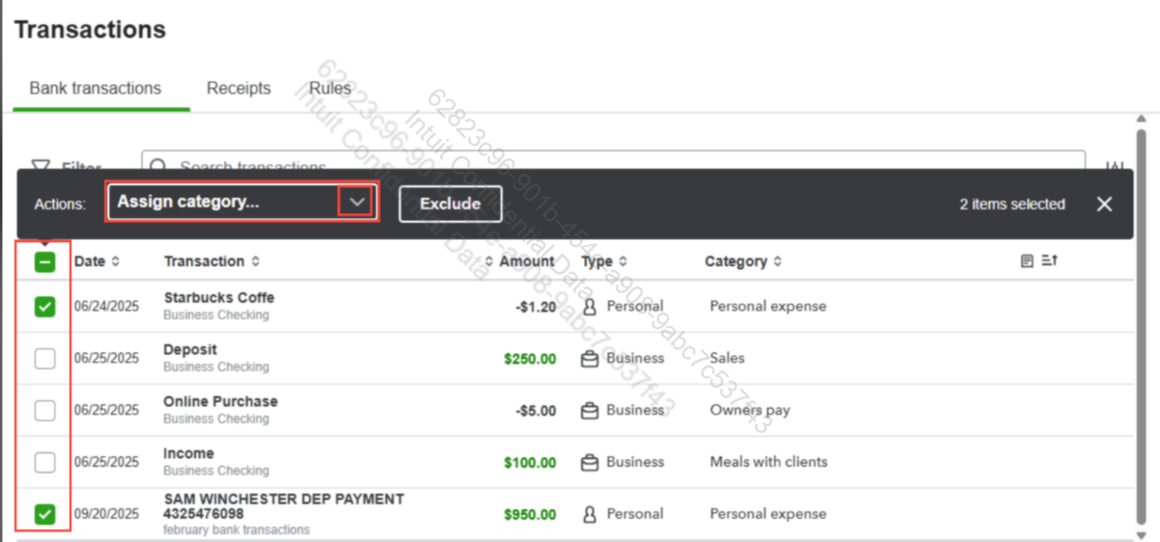
- On the Transactions page, locate the transactions that are miscategorized.
- Check the box for each transaction you want to change.
- In the Actions: tab, click the dropdown menu ▼ in the Category column and select the category that best describes the transaction.
- Once you’ve made your selection, the transaction will be updated to the correct category.
For more guidance, you can refer to this article: Categorize bank transactions in QuickBooks Solopreneur.
If you have any concerns, feel free to reply here at any time.




