Turn on suggestions
Auto-suggest helps you quickly narrow down your search results by suggesting possible matches as you type.
Showing results for
Get 50% OFF QuickBooks for 3 months*
Buy nowWhen I pull a Revenue by Client Summary report and a Sales by Client Summary report, I see different data sets. Why? What is the difference in Quickbooks Online between "revenue" and "sales"?

Revenue is the entire income a company generates from its core operations before any expenses are subtracted from the calculation. Sales are the proceeds a company generates from selling goods or services to its customers.
Welcome to the Community, @SVBC.
Let me share some information about the Revenue and Sales Client Summary report.
You are seeing different data because each report has its own unique set of information. The Revenue by Client Summary report gives us a picture of income, expense, and net income by customer.
On the other hand, Sales by Client Summary report tells us the total sales for each customer and the total sales from each job.
Furthermore, QuickBooks Online (QBO) offers dozens of reports that tell you about different aspects of your business. Learn how to customize them to ensure you'll get the right data. I've added this article for future reference: Customize Reports In QuickBooks Online.
Keep me updated in the comments if you have further questions about the reports in QuickBooks Online. I'm just a reply away. Keep safe and have a good one.
Why might a client appear on Revenue by Client Summary but not on a Sales by Client Summary for the same time period?
Good day, @SVBC.
Thank you for responding. I'd like to join this conversation and assist in identifying the potential cause of the discrepancy in the reports.
The data displayed in both reports is influenced by the filters applied to them. When you generate the Revenue by Client Summary and Sales by Client Summary reports using the default settings, you should see a list of your clients.
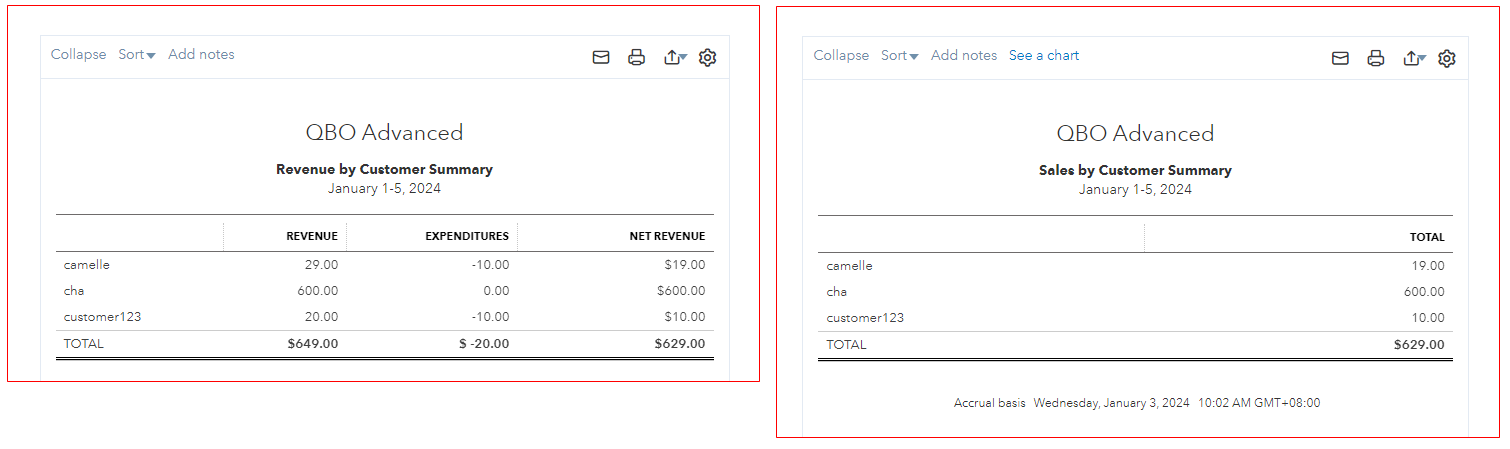
The list of customers in the Sales by Client Summary report may have been filtered, which could explain why a client isn't appearing for the same period as in the Revenue by Client Summary report. To check, let's open the report again and click Customize. Then, navigate to the Filter section. In the Customer drop-down list, ensure that All is selected.
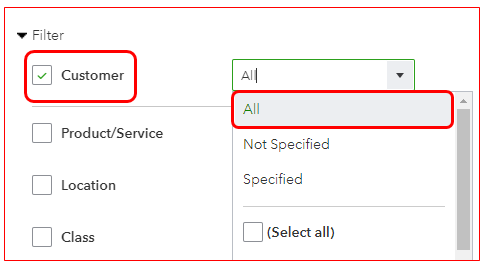
Moreover, you can check out this article for additional reference about customizing reports in QuickBooks: How to get the most out of your financial reports.
If you have any additional questions about reviewing your client's report in QuickBooks Online, feel free to add them to this thread. I'd be happy to assist you. Have a great day.


You have clicked a link to a site outside of the QuickBooks or ProFile Communities. By clicking "Continue", you will leave the community and be taken to that site instead.
For more information visit our Security Center or to report suspicious websites you can contact us here


