Linking a refund to a sales receipt is not possible, Vita. Let me share some information about your concern in QuickBooks.
Currently, it is not possible to directly link a sales receipt (money in transaction) with a refund receipt (money out transaction) in QuickBooks. However, if you use the same details on both transactions, it can help offset the amounts and provide a clearer picture of the transaction history.
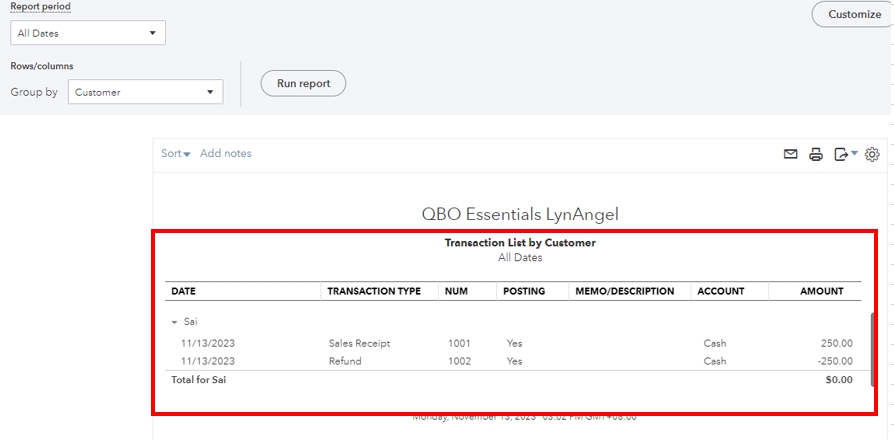
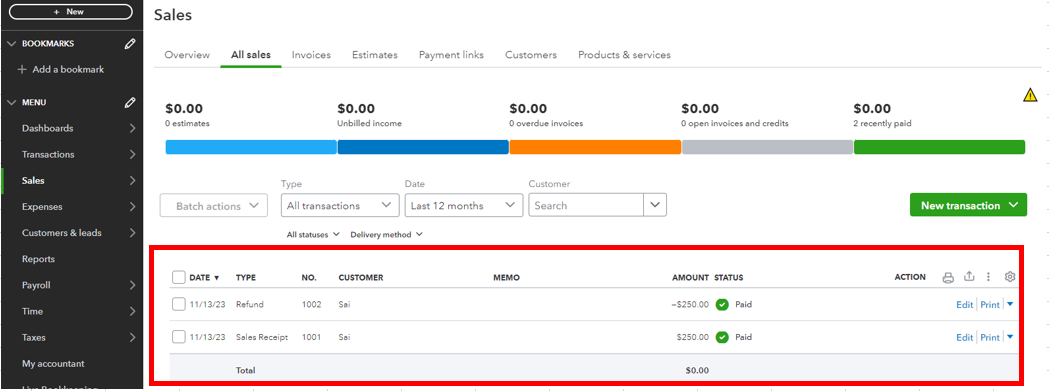
That said, you can pull up some reports or go to the Sales menu to see the offset amount. Just click the Sales menu and choose All Sales. For reports, you can run the Transaction List by Customer report. Here's how:
- Click the Reports menu, then enter the Transaction List by Customer.
- Navigate the Report period.
- Click the Gear icon, then hit the Customer checkbox.
- Select Run report.
You can refer to this article for more details: Run reports in QuickBooks Online.
Additionally, I will share these resources that will guide you on when to void or refund payment and how to schedule your sales receipts in QuickBooks:
Let me know if you have any other concerns with your transactions. I'm always around to help. Stay safe.




